Welcome to the QuickBooks Community, @Rachel - FLdoors. Let's perform some troubleshooting procedures to ensure your customer emails are populating in the Payment Reminder list in QuickBooks Desktop (QBDT).
If you wish to populate your customers' email addresses in the Body of your Payment Reminders, this is currently unavailable in the program. As per checking, the predefined fields are limited to specific company information only.
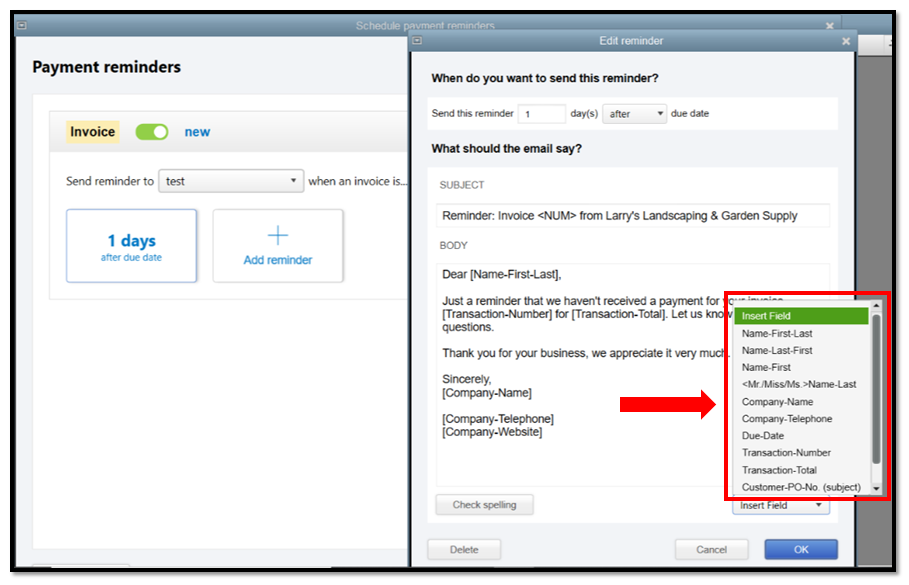
However, if you want them to populate when sending the reminders, make sure that you've set up an email address on your customer's profile in QBDT. If they have multiple emails, separate them with a comma.
Here's how:
- Go to the Customers menu and select Customer Center.
- Choose the customer and select the Address Info tab.
- In the Main Email section, enter the customer's email address.
- Click OK.
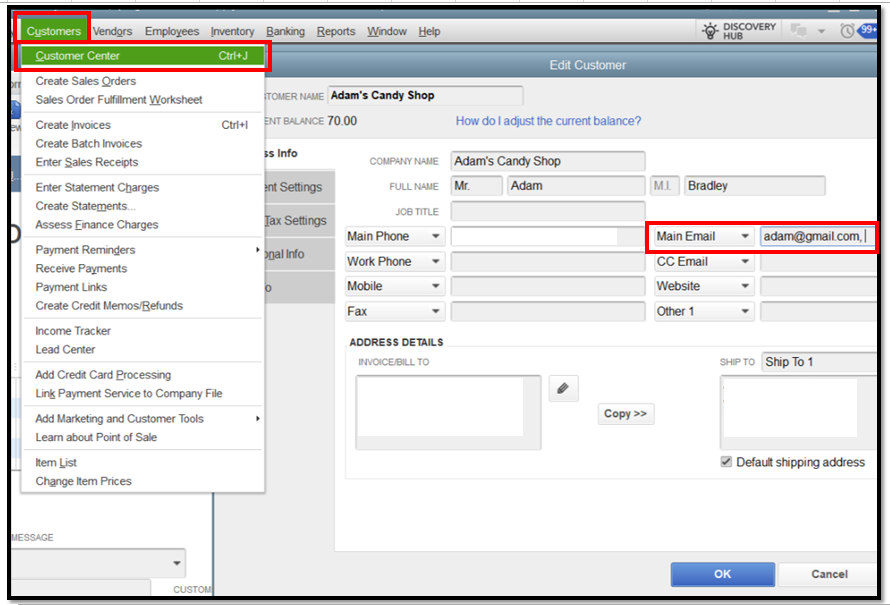
Once done, it should populate in the TO field when sending reminders. If the issue persists, open a sample file and check if you've encountered the same problem. If it works perfectly, go back to your company file and utilize the Verify and Rebuild tool to resolve common data issues.
When a customer pays an invoice, you'll need to record that payment in QBDT to mark it as closed. Otherwise, it will show as open and unpaid in your reports.
Let me know whenever you have any follow-up questions about invoice payment reminders. I'll make sure to respond as soon as we can. Stay safe and have a great day ahead.


