Turn on suggestions
Auto-suggest helps you quickly narrow down your search results by suggesting possible matches as you type.
Showing results for
Get 50% OFF QuickBooks for 3 months*
Buy nowHello,
I have to customize my invoice according to my clients' requirements. I have customized 2 invoice templates and I see them in the drop down menu under New > Invoice > Customize. However, when I select the desired template, it is not applied. I still see the default field names. I cleared my cache, logged ou and back in, but the problem still remains.
Thank you for your help!
Isabella

Thank you for reaching out to us regarding the issue while customizing your invoices, Isabella.
I'm glad you already took steps to resolve this. Let me provide some context about customizing invoices to help you further on your end.
When using the old layout, we can verify if a custom template has been applied by checking the Print Preview of the invoice after selecting it as default on Custom Form Styles or when creating a new invoice.
For new invoice layout users, we'll need to manually reapply the template under the Design tab when creating a new invoice.
After you've customized your invoices, feel free to check out this article about receiving payments from your invoices: Record invoice payments in QuickBooks Online.
Please do let us know if you have any other questions or concerns about customizing your invoices. We're always here to help you out.
Hello,
Thank you for your reply, but your answer wasn't helpful.
I have created my own invoice template. For one customer, I need to include 7 fields: date, task, PO#, Project#, Project Manager, rate, amount. However, when I click on new invoice and select the right template, only 6 fields show up. Plus, those are not labelled what I created. They are: service date, product/service, description, QTY, Rate, Amount. When I click on preview, I see the fields I created with the right label, but some of them are blank because I was unable to enter the information while creating my invoice. It's as if QB doesn't apply the template I created when I'm ready to issue my invoice. Seeing how my invoice look before saving it is no good for me.
I need to know if this is a feature that is offered by QB. Otherwise, this app is not for me. I have different invoices depending on my client's requests. I have already spent way too much time on this. I tried to find tutorials, I searched Google. They all show me how to create templates. I know how to do that. What I need to know is how to have QB apply my template when I select it in the list under 'Customize'. This is extremely aggravating.
Thank you for getting back to me.
Isabella [removed by moderator]
I hear your sentiments and appreciate you providing additional information regarding your concern about the invoice template in QuickBooks, Isabella. I'm joining this thread to share accurate details about it.
The template you created only applies when you print and send the invoice to your customer. I'm sharing this screenshot for additional reference.
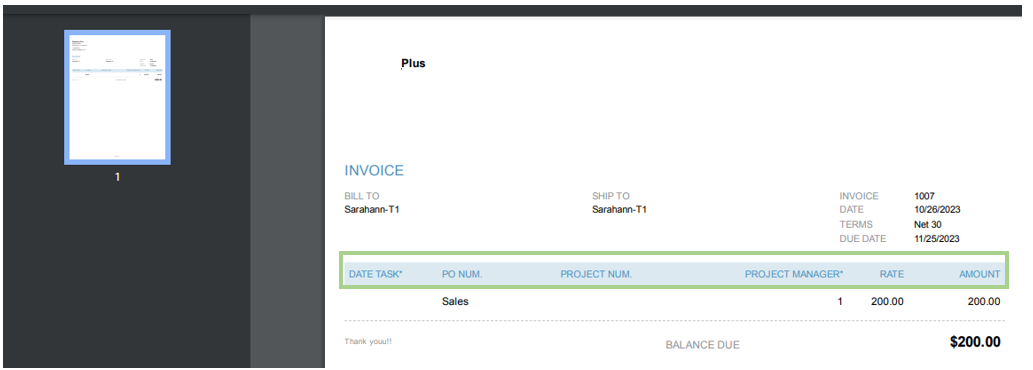
However, when you create it from the Invoice page, the default columns will not be modified. QuickBooks has been designed to work in this way.
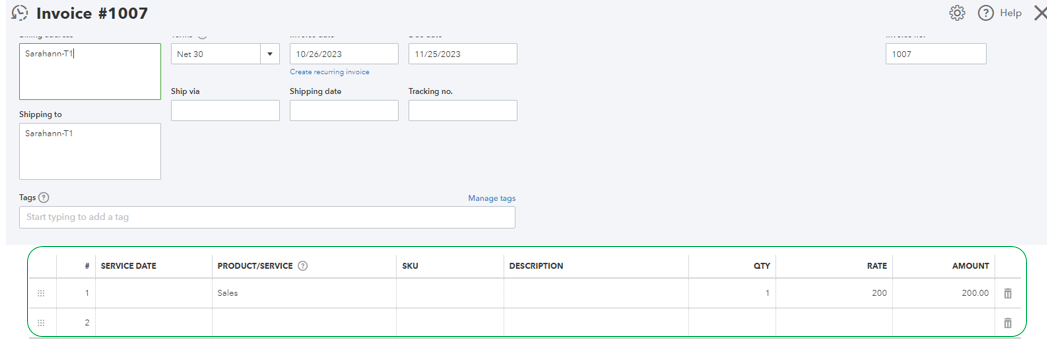
I understand that this option may not meet your needs. Alternatively, you can search for a third-party application that integrates with QBO and assists you in creating invoices based on the specific details you require.
Lastly, don't forget to send your valuable suggestion directly to our product developers. They will evaluate it thoroughly. Click on the Gear icon and select Feedback.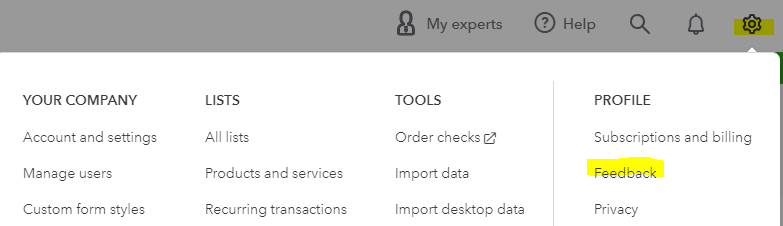
I'm adding this article to learn more about personalizing your sales forms: Customize invoices and other sale forms. It'll help you add unique data points relevant to your business needs.
Know that I'm here to assist you with any concerns about sales forms in QuickBooks. Feel free to tap me on my shoulder whenever you need help.


You have clicked a link to a site outside of the QuickBooks or ProFile Communities. By clicking "Continue", you will leave the community and be taken to that site instead.
For more information visit our Security Center or to report suspicious websites you can contact us here


