Turn on suggestions
Auto-suggest helps you quickly narrow down your search results by suggesting possible matches as you type.
Showing results for
Get 50% OFF QuickBooks for 3 months*
Buy nowHello everyone we have QB Enterprise Desktop configured for various reminders that every user except one depends on. This has now become an issue with our integration tool that we are using to push SalesForce accepted Quotes directly into QB Desktop as Sales Orders. The integration tool requires a user to be logged into QB Desktop which we can live with but when a configured reminder modal window pops up it stops the integration cold. The only solution seems to be to close the modal window and rerun the integration (which then runs successfully). I have disabled popups in the Preferences section of the integration user but that does not stop for example Payment Reminders to popup. Disabling reminders for everyone is not an option as they are used by everyone else. This is annoying as we are having to monitor the integration jobs and access QB Desktop just to close the window and re-run when this happens on a regular basis. Any thoughts/advice/help would be much appreciated!

Thanks for becoming part of the Community, tdclarence.
I can certainly understand how an ability to disable reminders for users could be useful and have submitted a suggestion about it as of today.
You can also submit your own feature requests while using QuickBooks.
Here's how:


Your feedback's definitely valuable to Intuit. It will be reviewed by our Product Development team and considered in future updates. You can stay up-to-date with the latest news about your product by reviewing Intuit's Product Updates webpage.
As a workaround, you could temporarily disable reminders while using your integration, then re-enable them when you're finished with the integration.
I've also included a detailed resource about working with reminders which may come in handy moving forward: Create & manage automated payment reminders for invoices/statements
Please don't hesitate to send a reply if there's any additional questions. Have an awesome Friday!
If you mean the reminders feature, which you can open from the QB Menu by picking Company | Reminders, then each user can enable or disable the popup when they log in, which you seem to be describing.
To control whether or not it appears at login, go to Edit | Preferences | Reminders | My Preferences
Thanks for the reply. That check box "Show Reminders List when opening a Company file" was unchecked so that unfortunately is not the solution. Basically for the integration user I want that user to stay logged into Quickbooks Desktop over a long continous period of time (this user does absolutely nothing else but is required for the integration app) with no modal windows to popup and stop the integration...never...ever. I've attached a screen shot of the error message from the integration app along with a screenshot of the QB modal window that causes the error. I have to go into the QB session (already logged in), and close the window then re-run the integration.
I understand the importance of ensuring seamless integration without any interruptions in QuickBooks Desktop (QBDT), tdclarence.
If you see any open dialog boxes, we can close out all your running programs. If the issue persists, we can end all QuickBooks processes in the Task Manager. Once done, open QuickBooks and sync the data again.
Here's how:
I've added a screenshot for your reference.
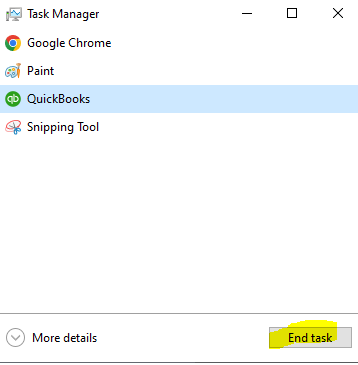
Keep me posted if you have questions about the integration process in QBDT. I'm always here to help. Have a great day.


You have clicked a link to a site outside of the QuickBooks or ProFile Communities. By clicking "Continue", you will leave the community and be taken to that site instead.
For more information visit our Security Center or to report suspicious websites you can contact us here


