Turn on suggestions
Auto-suggest helps you quickly narrow down your search results by suggesting possible matches as you type.
Showing results for
Get 50% OFF QuickBooks for 3 months*
Buy nowSolved! Go to Solution.

Good day, @huiling.
Could you please clarify where you are searching for these keywords? Also, could you let me know if you encountered any error messages, or describe what exactly happens when you try to search? Knowing these details will help us narrow down the cause.
If you're using the general search (magnifying glass icon) at the top of your screen, keep in mind that this is a Transaction Search. This feature is designed to locate transactions such as invoices, checks, and payments, so it will only display transaction types, dates, names, etc. It's not intended for finding specific items or products.
To search for a product directly:
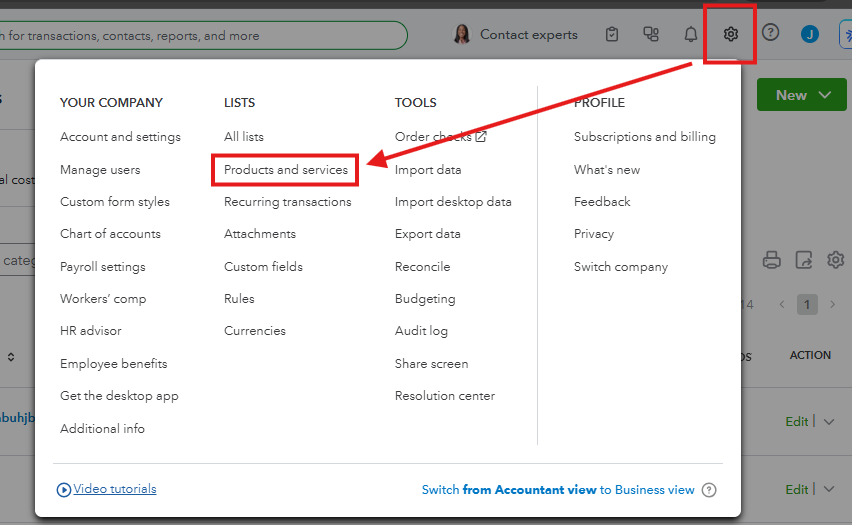
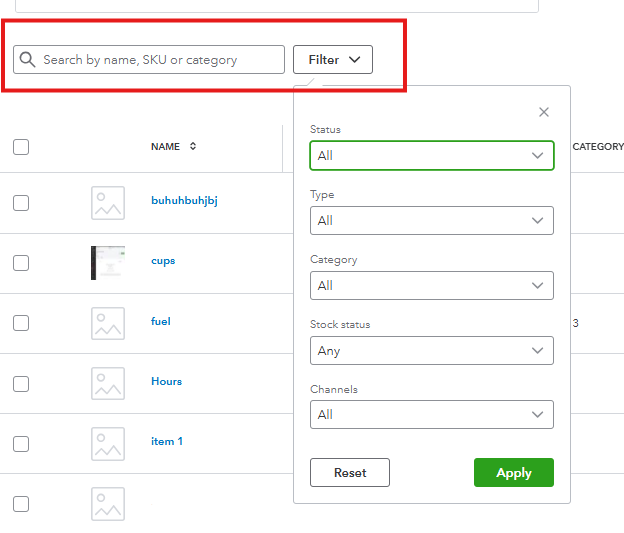
If you are already searching in this bar and some items are still not appearing, they may have been filtered out or marked as inactive. Please ensure that the Status is set to All (not just Active) and the Type is set to All.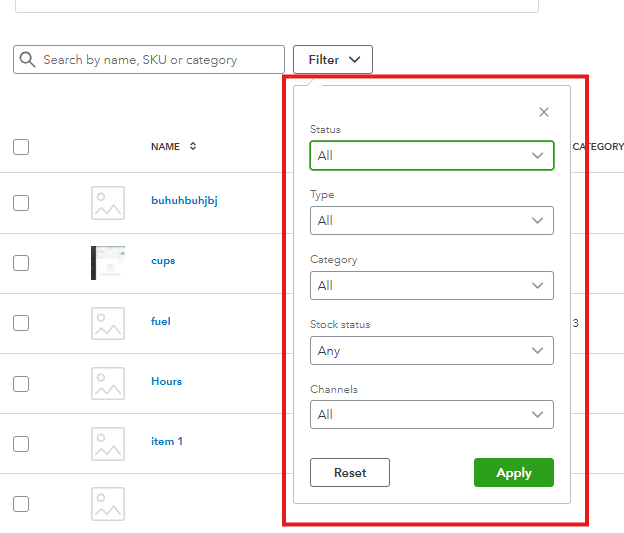
If you're referring to something else or have any additional questions, please feel free to reply to this thread.
Good day, @huiling.
Could you please clarify where you are searching for these keywords? Also, could you let me know if you encountered any error messages, or describe what exactly happens when you try to search? Knowing these details will help us narrow down the cause.
If you're using the general search (magnifying glass icon) at the top of your screen, keep in mind that this is a Transaction Search. This feature is designed to locate transactions such as invoices, checks, and payments, so it will only display transaction types, dates, names, etc. It's not intended for finding specific items or products.
To search for a product directly:
If you are already searching in this bar and some items are still not appearing, they may have been filtered out or marked as inactive. Please ensure that the Status is set to All (not just Active) and the Type is set to All.
If you're referring to something else or have any additional questions, please feel free to reply to this thread.
Hi @huiling,
I just wanted to follow up to check if the resolution we provided helped resolve your issue.
Please let us know if everything is now working as expected or if you’re still experiencing any problems.
We’ll be glad to assist further if needed.


You have clicked a link to a site outside of the QuickBooks or ProFile Communities. By clicking "Continue", you will leave the community and be taken to that site instead.
For more information visit our Security Center or to report suspicious websites you can contact us here


