Get 50% OFF QuickBooks for 3 months*

Buy now
cancel
Showing results for 
Search instead for 
Did you mean: 
Announcements
Simplify payday and set payroll to run automatically on QuickBooks.Explore QuickBooks Payroll
tehh01
Level 1

Export to Excel > Update existing worksheet, Legacy formats?

Hello,

So we've enabled Microsoft Baseline security mode settings for our environment and since then, when exporting to excel > update existing worksheet, we get an error.
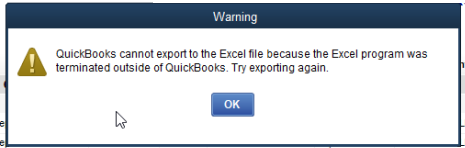
1.png

If you click "Ok" another error pops up saying "Excel update failed" then "Excel could not open the data file"


I've reinstalled Office, updated Office, and updated Quickbooks to the latest version. Same thing.

Looking through the Baseline security mode settings there are only a few settings that would affect excel:


Open ancient legacy formats in Protected View and disallow editing
Open old legacy formats in Protected View and save as modern format
Block ActiveX controls in the ‎Microsoft 365 apps
Block Dynamic Data Exchange (DDE) server launch in ‎Excel


Can someone confirm if Quickbooks would be affected by any of these legacy settings?


1 Comment 1
ThomasJosephD
QuickBooks Team

Export to Excel > Update existing worksheet, Legacy formats?

Hi tehh01, since this situation involves specific Excel settings, I recommend reaching out to an IT expert to confirm if QuickBooks would be affected by any of these legacy settings.


In the meantime, we can try toggling your Windows User Account Control (UAC) settings, as this often resolves underlying permissions issues that prevent successful exporting. For detailed instructions on how to do this, please refer to Step 4 of this article: Fix export to Excel issues in QuickBooks Desktop.


Please let us know if you have any more questions.

Need QuickBooks guidance?
Log in to access expert advice and community support instantly.

Need to get in touch?

Contact us