Thanks for reaching out, Christy. The option to revert to the previous QuickBooks Online (QBO) interface is no longer available.
As of October 1, 2025, all U.S.-based QuickBooks Online users will be permanently transitioned to the new user experience. Starting Wednesday, October 1, the migration to the new interface will be complete. Customers who previously opted out will begin receiving in-app notifications about this permanent change on Thursday, September 25, at 8:00 AM PST.
Since July 1, we’ve automatically opted in most USA-based users to the new QBO interface, while still allowing manual opt-outs. Accountants also had the ability to opt their clients out. However, as of October 1, 2025, the opt-out period officially ended. The opt-out settings were disabled, and anyone who previously opted out has been moved to the updated experience.
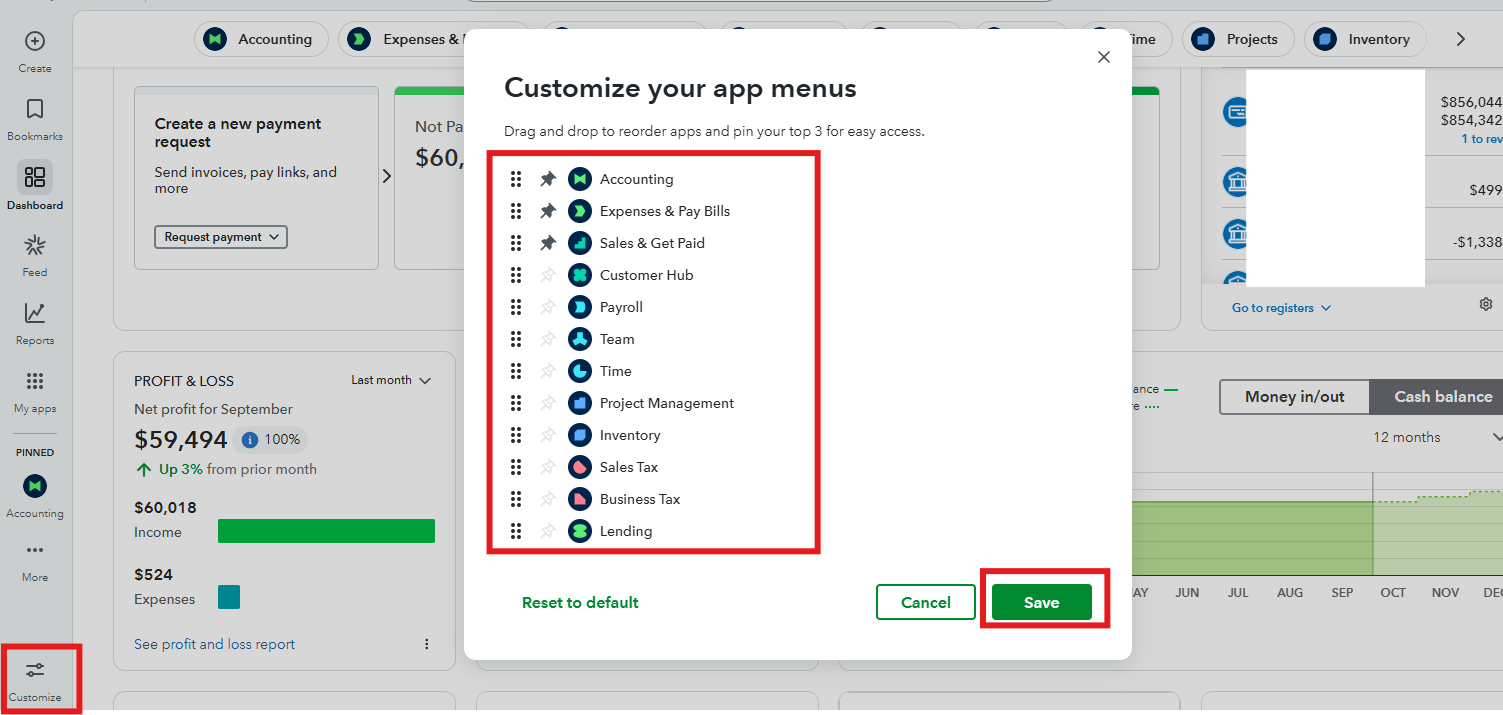
To make navigation easier in the new interface, you can customize your left menu for quicker access to apps. Here’s how:
- Open the left navigation panel and select Customize.
- Drag and drop apps to reorder them.
- Pin your top three apps for quick access and then click Save.
If you have any further concerns, feel free to reply. We're here to help!


