The process to cancel your QuickBooks subscription will depend on where you originally subscribed, Bryan.
If you purchased directly from Intuit, here's how you can do it:
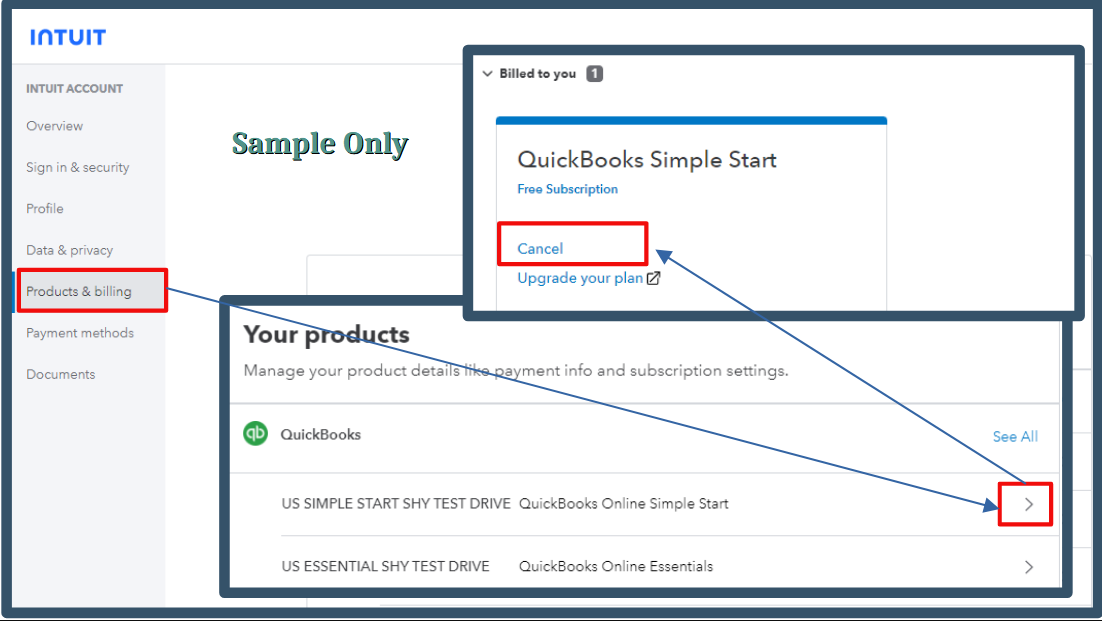
- Sign in to the Intuit Account Manager.
- Access the Products & billing area and choose the company name.
- Click the Cancel option.
- You'll see a multiple-choice survey on why you're canceling your subscription. Once done, press Continue to cancel.
- A page will appear providing the product benefits and the last day you can use it.
- Continue to cancel, then hit Got it.
If you subscribed through a mobile app store, you can find the cancellation process for Apple or Google in this article: Cancel your subscription.
To learn more about what will happen to your data after you cancel your subscription, visit this article: What Happens to my QuickBooks Online Data after I Cancel?
If you decide to use your account in the future, you can opt to resubscribe or reactivate it.
This thread will remain open for any further questions or clarifications. We're always here to assist you.


