In QuickBooks Online (QBO), you can change a vendor to a donor by setting up the vendor as a customer in your company file and changing the customer's label to donor. We'll provide more details below to resolve your inquiry.
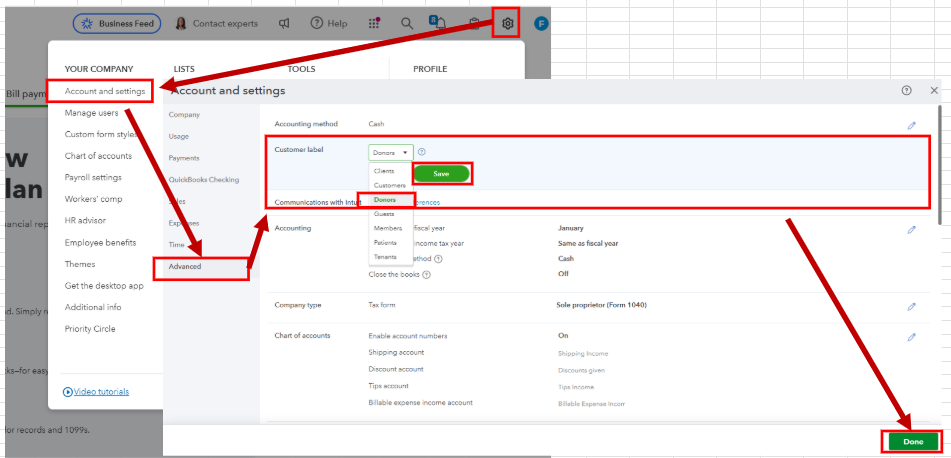
Before anything else, please know that there isn't a direct way to convert a vendor to a donor. That said, you'll have to use the vendor's information when entering them as a customer in the account. Once done, here's how you can change their label from customer to donor:
- On the top right corner, click the Gear icon and select Account and settings.
- Go to the Advanced tab and then click the Pencil icon the Customer Label section. If you don't see the Customer Label section, scroll down to the Other preferences section to modify the customer label.
- Click Save and then Done.
For visual reference see the screenshot below.
Our QuickBooks Live Expert Assisted are also ready to offer tips and guide you in streamlining the process of handling vendor transactions. Feel free to visit them anytime.
We look forward to assisting you again if you have other questions about QuickBooks or need assistance handling vendor transactions in the program. Feel free to utilize the comment section for a prompt response.


