Turn on suggestions
Auto-suggest helps you quickly narrow down your search results by suggesting possible matches as you type.
Showing results for
Get 50% OFF QuickBooks for 3 months*
Buy now
So great now Intuit has removed the offending “Please pay this invoice on time” but we are still left with this disaster of an email to send out with our invoices not to mention. I seem to have two or three different formats that go out now depending on the time of day or the weather maybe I’m not sure occasionally this new disaster goes out. Sometimes my original template goes out. I don’t have a rhyme or reason for what goes out. I should have the option to choose my own email message to go with my invoices not this piece of junk that Intuit has pushed out to us. Here we are two months later we’re still dealing with this piece of garbage. I’m still being Forced to edit the bulk of my emails going out for invoicing each month increasing my time on task three times. We pay too much money for this service to have to jump through these hoops for no good reason. This was not an improvement. It did not help me. I don’t believe that it’s helping any of us and yet here we are still begging Intuit To fix this problem.
Unless you have a special workaround, this does not work to return my email to the previous format. It is in fact, plain text. I lose the pay here button which my clients use the bottom line is we shouldn’t be spending our time trying to figure a workaround for a terrible update from Intuit.
I noticed yesterday that the 'Please pay this invoice on time' has been deleted.
I would still like to be able to edit my own email template. I don't like that the body of the message is centered. I wonder who the heck set up this stupid template.
Hi, @erickson101011. I understand the frustration of a recent update resetting your professional layout to a centered format. In QuickBooks Desktop (QBDT), editing an email template (like the one used for Invoices or Estimates) is done through the Preferences menu. It's somewhat hidden, so here's how to find it:
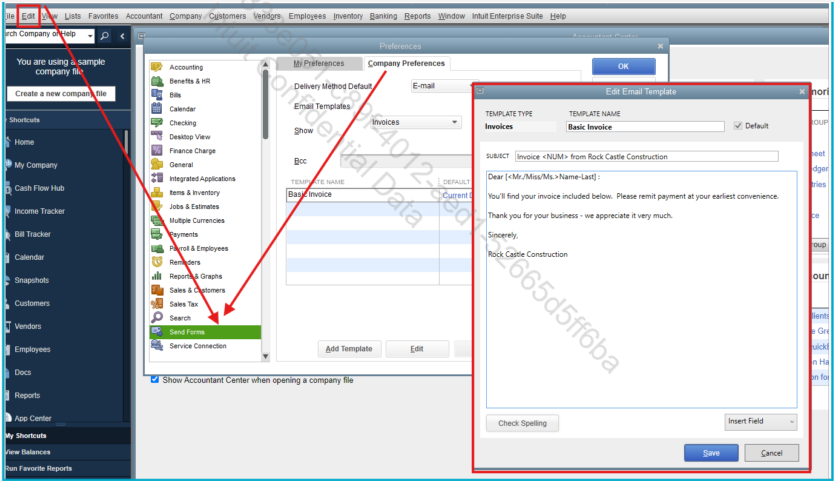
For more detailed steps, I have included this article for your reference: Create custom email templates in QuickBooks Desktop.
By following those steps in the Company Preferences, you’ll be able to get your professional wording back in place. If you need additional assistance, feel free to comment below. We're available to help 24/7.
Please let me know what company(ies) you find are easiest to switch to. Of all the stupid things QB has done over the years (don't get me started...) this takes the cake. Not allowing the CUSTOMER to make the choice on the look and verbiage of the invoice is just insane for what we are paying for. It looks so tacky, and to tell your customer to pay on time? How rude! I would get so much flack from my clients if I sent my invoices with that on it! I need to change out of QB. ANY ADVICE FROM ANYONE WOULD BE HELPFUL !!!
PLEASE let me know who you find!!
Did you even read my post?
I know how to edit a template in QBKS. READ MY POST AGAIN…pay attention to detail this time.
Hi there, @erickson101011. We can see that the invoice email templates aren't quite what you had in mind. To help us meet your preferences, I encourage you to share your thoughts with our development team. Your feedback can help us decide which layouts and features to enhance in future updates.
Here's how:
For more concerns, please let us know. The Community forum is always here to guide.
Wow, Quickbooks.....
You fixed it for a Quick minute but just like that, the offending words came back. What's it gonna take for this to be fixed efficiently?


You have clicked a link to a site outside of the QuickBooks or ProFile Communities. By clicking "Continue", you will leave the community and be taken to that site instead.
For more information visit our Security Center or to report suspicious websites you can contact us here


