SALE EXTENDED 70% OFF QuickBooks for 3 months*   Ends 12/8

Buy now
cancel
Showing results for 
Search instead for 
Did you mean: 
Announcements
Simplify payday and set payroll to run automatically on QuickBooks. Explore QuickBooks Payroll
msrachell
Level 1

How do I Enter cash payments?

This did help. My customers pay in cash

1 Comment 1
RhoiceW
QuickBooks Team

How do I Enter cash payments?

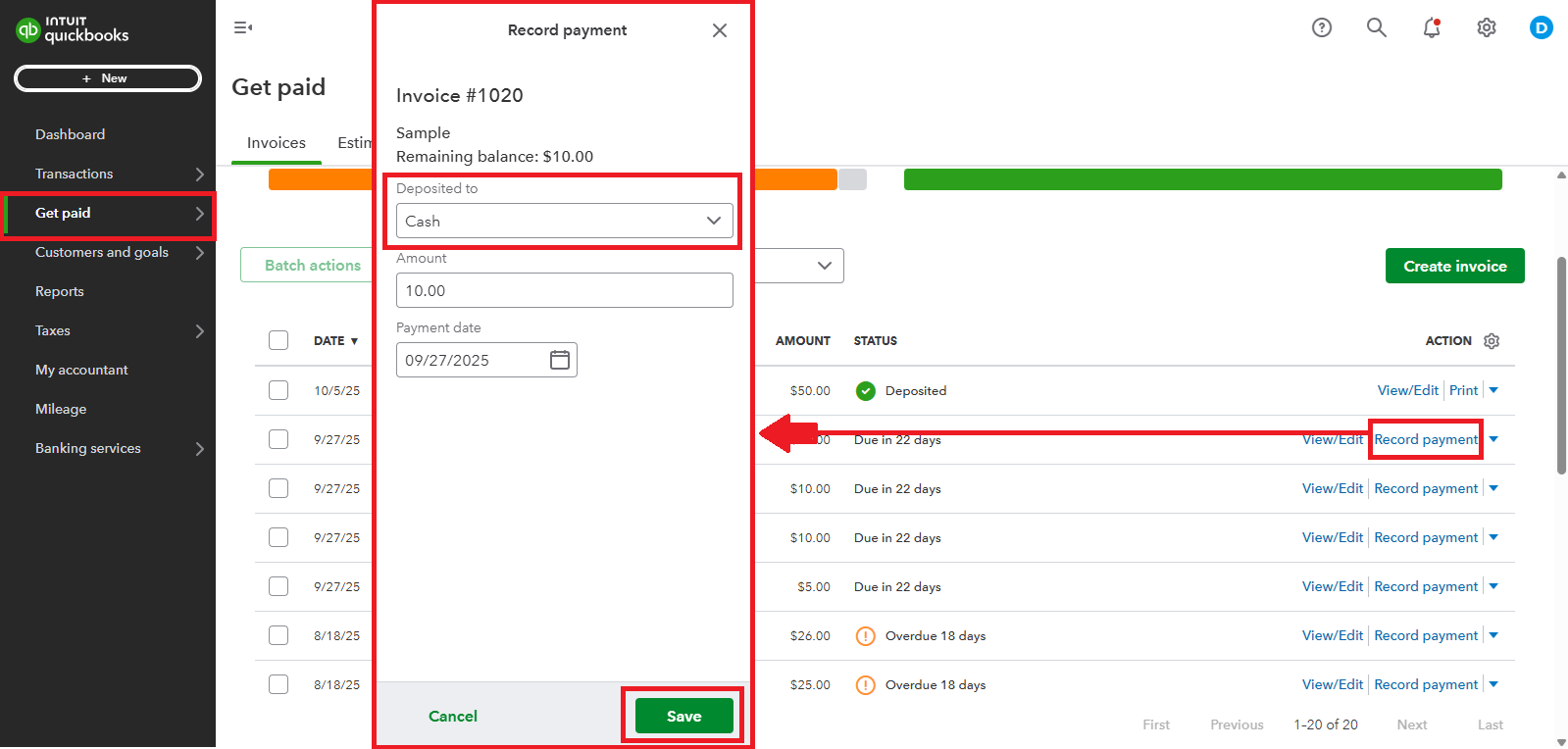
Hi there, Rachell. To enter a cash payment for an invoice in QuickBooks Solopreneur, you can manually record the payment.


Here's how:


  1. Log in to your QuickBooks Solopreneur account.
  2. Go to Get paid section on the left panel.
  3. Select Invoices and locate the invoice.
  4. Click Record payment. Then, on the Deposited to field, select Cash.
  5. Enter the amount and payment date.
  6. Select Save, once done.


If you have other concerns related to QuickBooks, don't hesitate to reply to this thread. We'll be in touch with you right away.

Need QuickBooks guidance?
Log in to access expert advice and community support instantly.

Need to get in touch?

Contact us