Welcome to the Community, 3223.
1099 forms are used to report payments made to independent contractors or vendors by your business to ensure tax compliance. Filing these forms correctly is essential for both your business and contractors to avoid penalties.
You can file 1099s directly with the IRS using their Information Returns Intake System (IRIS). To e-file in IRIS, you’ll need to register for a Transmitter Control Code (TCC). This process can take up to 45 days. To learn more about the requirements and how to register with IRIS, please check E-file Forms 1099 with IRIS.
To prepare the reports needed for IRIS upload, here’s how:
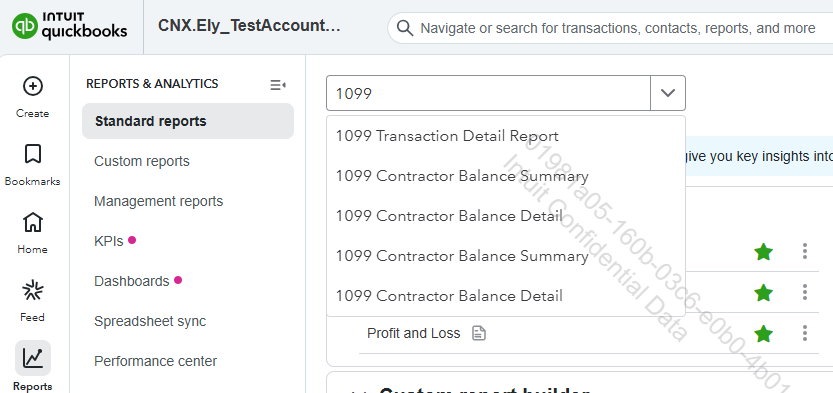
- Navigate to Reports, then Standard reports.
- In the search tab, look for 1099 Transaction Detail Report.
Please note that there are other reports related to 1099 in QuickBooks.
3. Export the report you have selected in Excel or CSV format.
4. Verify that the report's formatting meets IRIS upload requirements based on IRS specifications.
Make sure all the information is completed and accurate in the report. This helps protect your business from mistakes, penalties, and delays when filing your 1099s.
If you have further questions related to 1099 in QuickBooks, don’t hesitate to Reply to this post. We’re here to assist you.


