Turn on suggestions
Auto-suggest helps you quickly narrow down your search results by suggesting possible matches as you type.
Showing results for
Get 50% OFF QuickBooks for 3 months*
Buy now

I appreciate you for trying the Update button and other things to fix the error you've got, affinity.
Can you share your bank's name. This way, I can further check my resources and provide accurate information about it.
For now, I recommend you manually upload your bank data. Log in to your bank website and get your transactions using a CSV file. Once done, you can follow the steps below to bring them into QuickBooks.
For the information and steps on importing bank data, we can visit this article: Manually upload transactions into QuickBooks Online.
You can check these articles for guides when reviewing and reconciling your accounts. The articles below will serve as your guide:
If you have more concerns about connecting accounts and handling transactions, please know that I'm here to help you.
Thank you for your comment. To answer your question, the bank is Wells Fargo. In regards to the proposed interim work around, unfortunately it isn't feasible to manually download transactions as I don't know which have and haven't been already downloaded into quickbooks. It is not easy to check as it is a business checking account with thousands of transactions a week. I need the problem fixed, not workarounds.
Bank is Wells Fargo. I can't manually download transactions as I don't know which have and haven't downloaded already and checking isn't feasible as there are thousands of transactions a week on this business account. I do not want work arounds. I need the problem fixed and the service I'm paying for to work.
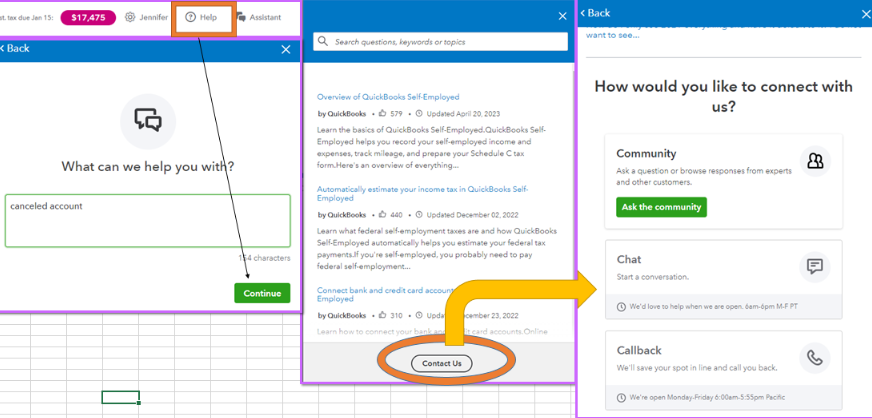
I heard your sentiment, @usercamson. I'm here to help you resolve this issue while connecting your bank in QuickBooks Online. I'll provide the steps for contacting our support team in QuickBooks Online.
Thank you for providing the details regarding your bank. This information will assist in identifying the issue and exploring potential solutions. I recommend reaching out to our support team, as they can review your account in a secure environment and investigate 355 errors related to your bank.
Please see the steps below:
The Community is here for you 24/7 on the clock. If you need to drop your additional comments, notify us below. Keep safe.
I do not want work arounds. I need the problem fixed and the service I'm paying for to work.
Last resort, explore MT Online as a workaround.
https://www.moneythumb.com/?ref=110
This NEEDS TO BE FIXED. It has been happening for some time now and QBO needs to address it!
We know the importance of fixing this concern, @Plus 2. We're hearing your sentiment. Let us give you the support that can guide you further regarding the 355 error you're experiencing.
While we understand your urgency in resolving the issue, note that we can't provide a solution in this public forum as we can't access your account information. However, we highly recommend reaching out to our support team. The team has the necessary expertise and tools to assist you effectively. Let me show you how to contact our support team:
On the other hand, you can view this link once you download your transactions from your bank accounts inside QBO: Download the most recent bank and credit card transactions in QuickBooks Online.
For further questions about connecting your bank in QBO, leave a reply below. We'll be here to assist you. Take care.


You have clicked a link to a site outside of the QuickBooks or ProFile Communities. By clicking "Continue", you will leave the community and be taken to that site instead.
For more information visit our Security Center or to report suspicious websites you can contact us here


