Get 50% OFF QuickBooks for 3 months*

Buy now
cancel
Showing results for 
Search instead for 
Did you mean: 
Announcements
kat97
Level 1

How do I turn off AI on my QuickBooks Online account? I did not ask for and do not want this feature.

 
17 Comments 17
Sydney_GuidedSet-Up
Level 1

How do I turn off AI on my QuickBooks Online account? I did not ask for and do not want this feature.

The Accounting Agent can be switched back to the previous banking experience. To do so, go to the Bank Transactions page and select Opt-out of new banking page. This will remove the AI-powered categorization and the Collaboration feature. The Payroll Agent can also be turned off. The other AI Agents can not be turned off at this time. 
If you have any other questions or run into any other issues please feel free to contact us. 
[removed]

EduardA
QuickBooks Team

How do I turn off AI on my QuickBooks Online account? I did not ask for and do not want this feature.

You're correct, @Sydney_GuidedSet-Up, regarding which AI agents can be turned off in QuickBooks Online and the capability of going back to the previous banking experience.


@kat97, if you'd prefer to turn off the AI-powered categorization, you can follow Sydney's instructions. However, if the Opt-out of new banking page option is not available on your end, you can select Switch to previous version instead. Please note that QuickBooks is gradually integrating AI-powered tools to streamline accounting tasks. As a result, the ability to revert to the previous banking experience may only be available for a limited time.
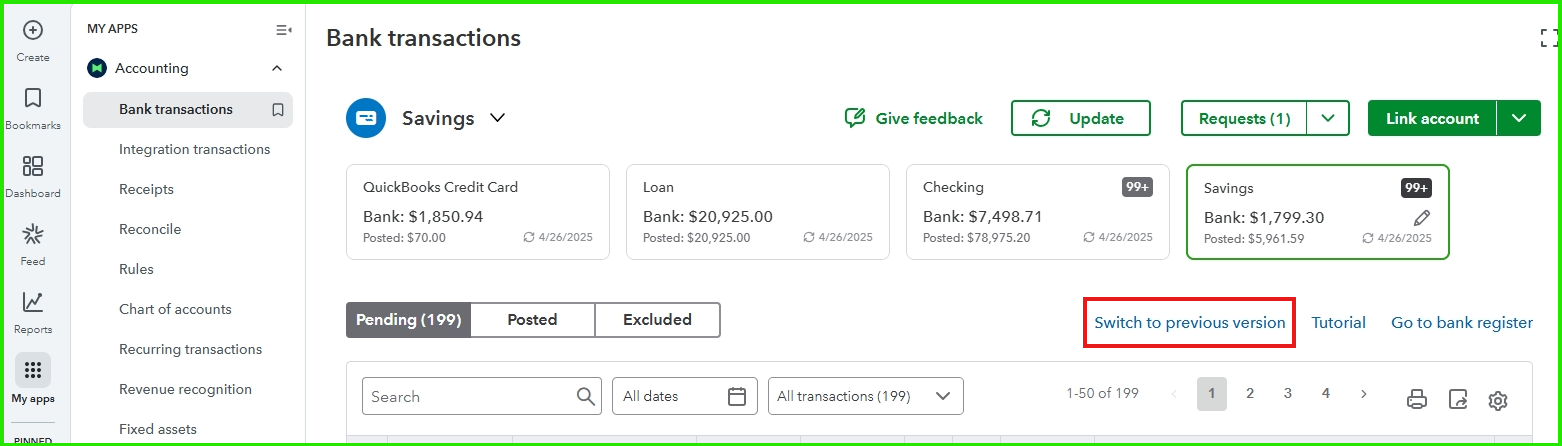
 

On the other hand, if you have feedback about the AI features in QuickBooks, we strongly encourage you to share your thoughts with us. Here's how you can do it:


  1. Go to Accounting, then select Bank transactions.
  2. Click the Give feedback link.
  3. Enter your feedback and click Next.


We value your input and want to ensure QuickBooks continues to meet your needs. If you have further questions or need additional help, feel free to reply, and we’ll gladly assist you.

schroeder2
Level 5

How do I turn off AI on my QuickBooks Online account? I did not ask for and do not want this feature.

As usual, ignoring the real question: HOW DO WE TURN OFF ALL OF THE AI FUNCTIONS?


We didn't ask for the AI functions, don't want them, and definitely don't want to pay for something that makes our company looking like blooming idiots from the output of AI.

JackRambinDiamond
Level 2

How do I turn off AI on my QuickBooks Online account? I did not ask for and do not want this feature.

I feel similarly. I don't want an "upgrade" or "improvements" - the interface is CONSTANTLY changing. I'm not a fulltime accountant, use this to manage my business. I cannot keep up with these changes. I don't need or want AI assistance. 

No nonsense
Level 1

How do I turn off AI on my QuickBooks Online account? I did not ask for and do not want this feature.

QUICKBOOKS! Please answer the question your users asked. I have the same question and I am waiting for a reply.. HOW DO WE TURN OFF AI? Many of us do not want this feature. Personally, I preferred QuickBooks the way it was several versions ago. The constant changes are frustrating. You are not an smart phone, you don't need constant upgrades. And please stop all of the distracting pop-ups. We can turn off ads but it's you that keeps trying to sell us additional products. It takes our time away from our work, it is not making it easier. Instead leave a product option in the menu. We pay for QB online, don't force us to have to respond to your marketing.

SarahCO
Level 4

How do I turn off AI on my QuickBooks Online account? I did not ask for and do not want this feature.

I totally agree. They just increased prices a lot, probably due to AI. The AI features take up space on my screen, make everything take longer to load, and are not something I have any interest in using. Yet it is being forced on us. No thank you. I think it's time to leave QuickBooks for good.

schroeder2
Level 5

How do I turn off AI on my QuickBooks Online account? I did not ask for and do not want this feature.

OK, based on the email from Intuit today, our requests to quick shoving AI down our throats, to quit changing the interface, etc., has been met by a new wave of AI that is going to totally change the interface and force us to navigate countless new AI agents to do our daily tasks. Guess their programmers had to be able to tout their AI background on their resumes.


Nothing like a company that totally ignores their customers. Maybe they should consider two products, QBO and QBO-AI. 

JackRambinDiamond
Level 2

How do I turn off AI on my QuickBooks Online account? I did not ask for and do not want this feature.

Does anyone have suggestions for a simple, straightforward accounting software which offers an alternative? I don't want this AI junk, even before AI, Quickbooks constantly suggests the "Wrong" matching things when things are semi-automated. If I don't trust their automated suggestions (which I have to always monitor because they are so often wrong) and have to un-do, there is no way I will trust their AI functionality. 

JackRambinDiamond
Level 2

How do I turn off AI on my QuickBooks Online account? I did not ask for and do not want this feature.

This is incredibly frustrating. Even before the AI "Solutions" a lot of the automated features were not working properly for me. Things coming in on the feed from bank accounts and credit cards are constantly mis-matched with categories. I don't mind doing this part manually, because that means it will be done properly. 


Great suggestion for two versions of the software.

Unless a QBO (vs. QBO-AI) alternative can be secured, I will be searching for a new software. Please, anyone have suggestions? I am not an accountant, doing basic bookkeeping for a small business. 

SarahCO
Level 4

How do I turn off AI on my QuickBooks Online account? I did not ask for and do not want this feature.

I didn't get that email. Can you share it here?

schroeder2
Level 5

How do I turn off AI on my QuickBooks Online account? I did not ask for and do not want this feature.

Not sure if the links will come through correctly: (When I tried to post, it gave me some error messages. I think it just removed the hyperlinks.


We're reaching out to inform you about an upcoming update to the QuickBooks user interface on the Intuit Platform, starting in February. No action is required at this moment and your data and settings will not change.
Here’s what to expect:
Customizable navigation you can tailor to quickly access key business tools and frequent actions.
Optimized search to more easily navigate the Intuit Platform and quickly find transactions, contacts, accounts, reports, help and more.
An App Carousel that connects you to your most critical jobs, including customer management, accounting, expenses, payments, and payroll.
A Business Feed with work done by Intuit’s AI agents, ready for your review & approval, and tips on next steps.
We are here to help you navigate and maximize the benefits of a more powerful QuickBooks:
Article with an explainer video and overview of what’s changed in the new experience.
Additional support from help articles, community discussions with other QuickBooks users, video tutorials and more.
Thank you for being a valued QuickBooks customer. We look forward to continuing to support you and your business for years to come.
The QuickBooks Team
PH-aus
Level 1

How do I turn off AI on my QuickBooks Online account? I did not ask for and do not want this feature.

How about you make 'ai' opt-in?


Or even better, how about you don't have it at all?


Why would I want some predictive model to make random changes to precise financial data that I'm required to keep BY LAW?

schroeder2
Level 5

How do I turn off AI on my QuickBooks Online account? I did not ask for and do not want this feature.

Well the new Interface is everything Intuit promised: I can't navigate to a different screen without having to click to close some AI suggestion that has no bearing on my tasks at hand. And just because you close it once, doesn't mean you aren't going to see it again.


This afternoon, I tried to enter a parking meter charge into QBO: I had to close 3 different windows of useless information to be able to see my screen. Then, when I finally completed the task, rather than returning to the Expense screen, it popped up some screen trying to automate some unrelated task. 


I need to be able to manually enter my data without all of these distractions. And I need real time data. I can't wait for QBO to go download a transaction on my credit card that might not hit for several days or even a week. 

Janiqueca_T
QuickBooks Team

How do I turn off AI on my QuickBooks Online account? I did not ask for and do not want this feature.

Hello there, schroeder2.


We understand your need for a seamless experience when entering data and navigating QuickBooks Online without unnecessary distractions. The AI suggestions and pop-ups you’re encountering are part of features designed to assist users, but may interrupt manual workflows for some tasks.


To better align QuickBooks with your needs, I encourage you to share your feedback directly with the team. Click the Gear icon and select Feedback. Your insights are essential in shaping future updates and enhancing the platform to better support your workflow.


If you have any other questions, please reply below. We’re here to help.

JackRambinDiamond
Level 2

How do I turn off AI on my QuickBooks Online account? I did not ask for and do not want this feature.

I have submitted feedback on this issue. Reiterating the desire to TURN OFF ALL AI "ASSISTANCE"

It is not useful for me, I want to be able to manually match charges and enter data.


Please, if this cannot be added, I will look elsewhere for an accounting solution. 

JackRambinDiamond
Level 2

How do I turn off AI on my QuickBooks Online account? I did not ask for and do not want this feature.

I agree with your frustrations and have my own. The interface keeps changes and even before this automated AI stuff, often the "smart matches" suggested by QBO are inaccurate. Fine if this is useful for some, but please, MAKE IT EASY FOR US TO TURN THE AUTOMATION OFF. 


schroeder2
Level 5

How do I turn off AI on my QuickBooks Online account? I did not ask for and do not want this feature.

As others have stated, we have given feedback, it is beating a dead horse. 


What I want is a software package that is as functional as my 2014 Quickbooks Desktop Premier. 


- I don't want to have to click off all of the suggestions for letting your AI functions take over my business. Your business model is not my business model. Had I realized this was the direction you were going, I would never have gone to the Online version. I might have just kept an old computer around that would still support the 2014 desktop version. I can't handle the wasted time clicking on items to enable me to get to the meat of the program.


- I want to be able to turn off AI completely. 


- I have no intention of ever allowing QBO access to my bank accounts. Besides the obvious security issues that involves, it also could be an invasion of my customers confidentiality. 

Need QuickBooks guidance?
Log in to access expert advice and community support instantly.

Need to get in touch?

Contact us