I understand how disruptive pop-ups can be when you're trying to get things done quickly, Brian. Let's work through this together and get everything sorted for you.
If it's Intuit's products and services or Third-party products and services pop-ups, you can toggle them off by heading to the Marketing preferences.
Here's what you can do:
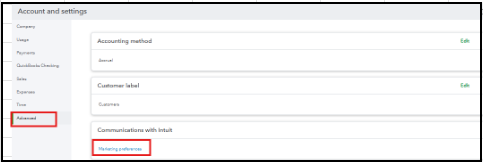
- Navigate to the Gear icon and select Account and settings.
- Go to the Advanced tab and look for the Marketing Preferences link, and click on it.
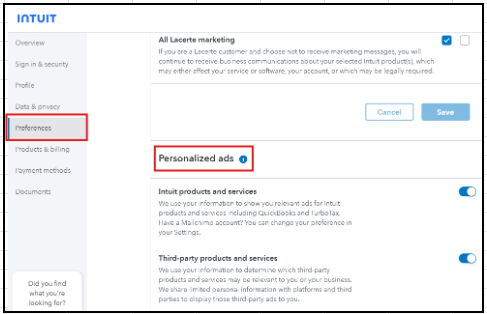
- Once there, scroll down to the Personalized Ads section.
- Disable either Intuit products and services or Third-party products and services.
If this doesn't apply to your situation, there isn't a direct way to turn off the pop-ups at the moment. You can dismiss the ads by clicking the X or No, thanks button as a workaround.
Since this option is not yet available, it'd be great to share this feedback with our product developer so they can review it and consider it for the next enhancement.
Please don't hesitate to share any other questions in the comments, and we're here to help.


