Please know that adding a late fee field in the invoice template is currently unavailable in QuickBooks Online.
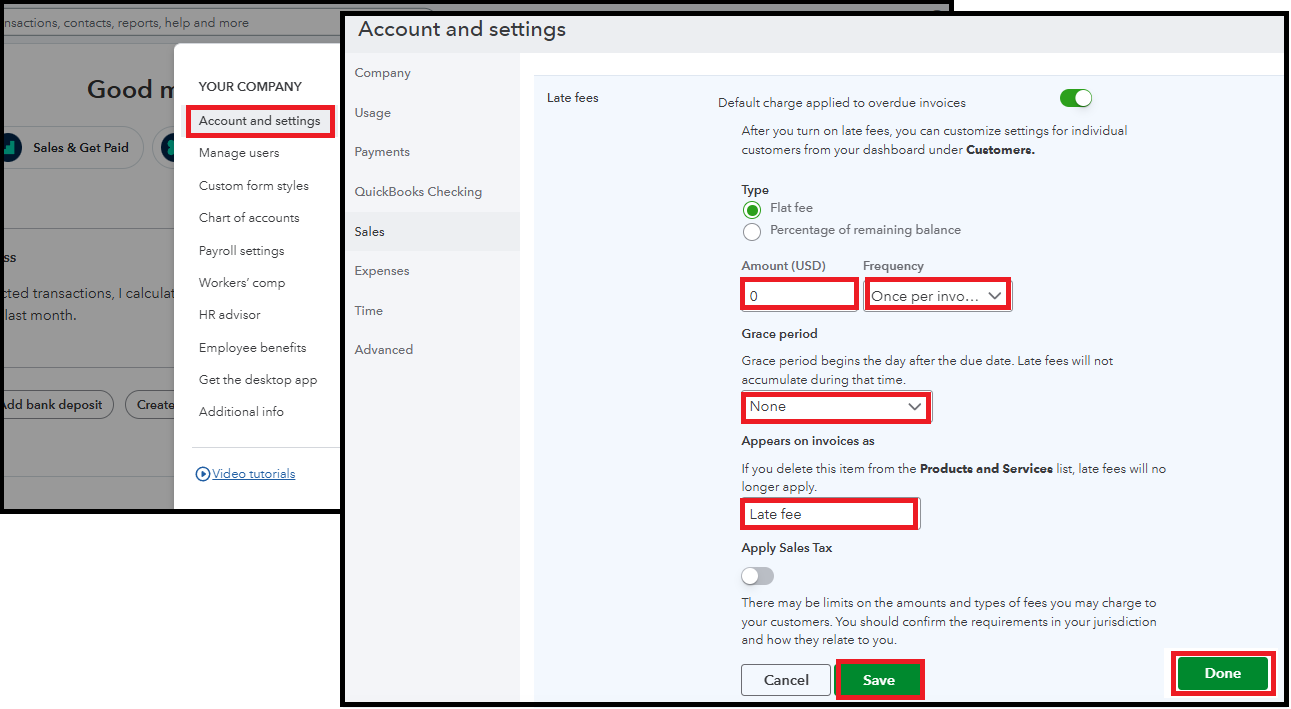
Instead, you can turn on the Late Fee feature in your Account and settings. It will automatically create a product and service item that you can use to include and calculate late fees on invoices. Here's how:
- Go to Settings and select Account and settings.
- Click Sales and find the Late fees section, then click Edit ✎.
- Toggle on the Default charge for overdue invoices switch.
- Enter the late fee Amount or Percent (%), and select how often to charge it from the Frequency dropdown.
- Set a grace period by selecting the number of days from the dropdown.
- Customize the default name for "Late fee."
- Click Save.
To apply it to older invoices, you can edit the invoice manually and add the late fee as a separate line item.
This thread will remain open for questions or clarifications on any QBO-related concerns. We're always here to help.


