Get 50% OFF QuickBooks for 3 months*

Buy now
cancel
Showing results for 
Search instead for 
Did you mean: 
Announcements
vraiteri
Level 1

How to generate statements for private practice that patients can submit to insurance companies.

The statements emphasize invoice numbers and the CPT service codes and dates-of-service are hard to decipher.

2 Comments 2
ChristineJoieR
QuickBooks Team

How to generate statements for private practice that patients can submit to insurance companies.

Hello there, Vraiteri. I'll provide a way to add the CPT codes so patients have the necessary info to submit to insurers.


In QuickBooks Online, CPT codes added as items or included solely in the line item details will not appear on customer statements. The Statements feature summarizes invoice balances, including dates of service, descriptions, and amounts. However, it doesn't display line-level details, such as CPT codes, and it functions as designed in the software.


Alternatively, we can manually add the CPT service codes in the Description or in the Memo on Statement (hidden) section of the invoice to ensure they appear on customer statements.


See screenshots below:
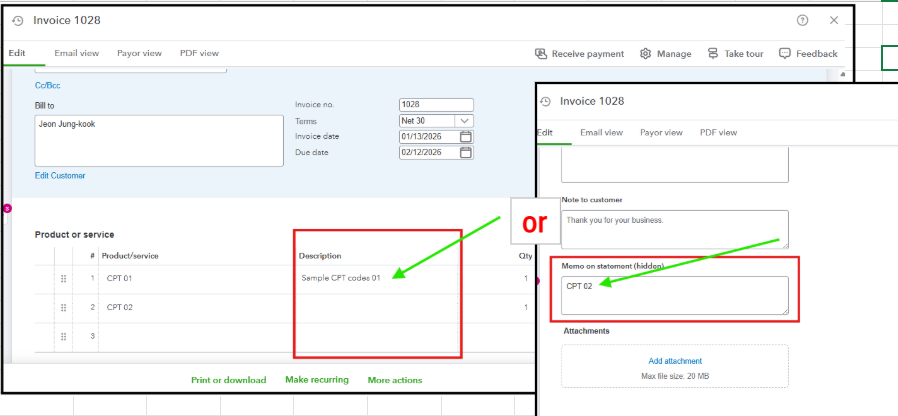
 

Additionally, we can download and print a PDF file for your patients, so they can submit a copy to their insurance company. See screenshot below to download a statement:
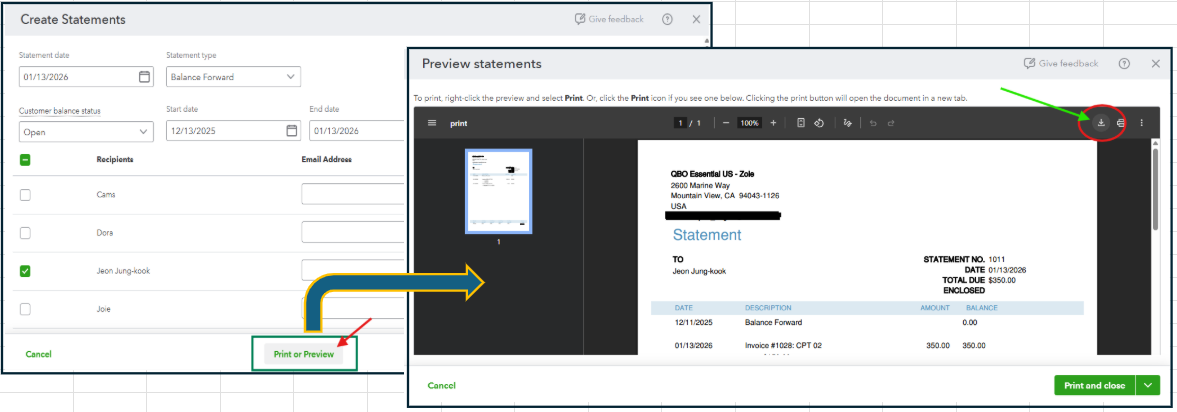


Please let me know if you have any other concerns regarding this topic, Vraiteri.

ChristineJoieR
QuickBooks Team

How to generate statements for private practice that patients can submit to insurance companies.

Hello, Vraiteri.


We just wanted to follow up and check if the solution we provided has resolved your concern.


Please let us know if everything is now working as expected. If you need any further assistance, we’re here to help.


Looking forward to your response!

Need QuickBooks guidance?
Log in to access expert advice and community support instantly.

Need to get in touch?

Contact us