Yes, tirthya. You can retrieve the customer's ID. I'm here to help you with that.
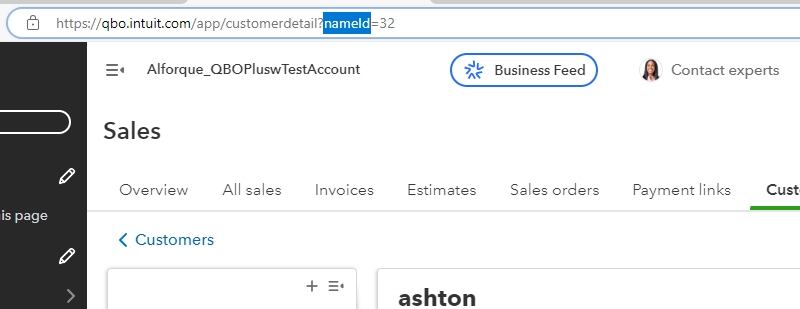
To bring back the client ID, follow these steps:
- On the left corner of your screen, click Sales tab.
- Select Customers.
- Click the customers that you want to obtain.
- This is how to check the customer's ID.
Moreover, if you have more questions about API-related issues, we have a separate dedicated Intuit Development Support team with expertise in this area.
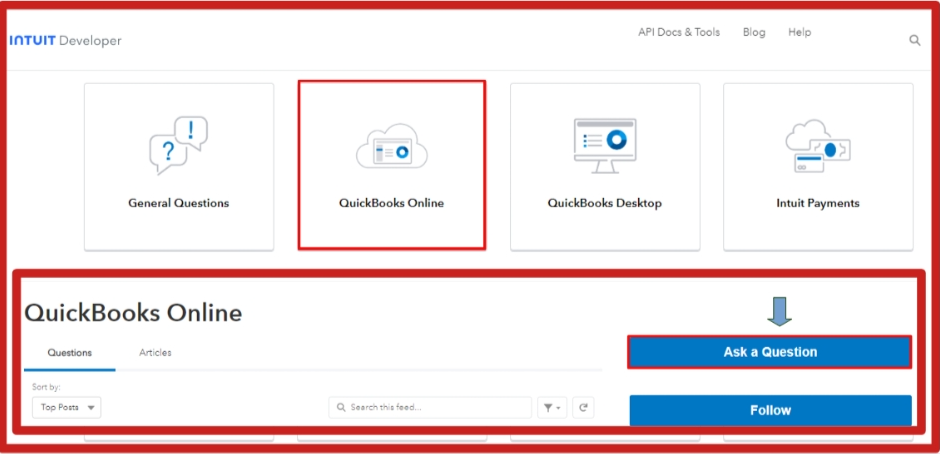
Here's how to connect with them:
- Visit this link: https://help.developer.intuit.com/s/.
- Choose your QuickBooks product.
- Select on Ask a Question.
- Please sign in and follow the prompts appearing on the screen to continue.
Additionally, visit this article on how to learn how to manage your products and accounts effectively in QuickBooks Online: Changing product and service types in QBO.
We're always here in the Community to help if you have other questions about recovering customer IDs in QBO. I'll be around to lend a helping hand.


