Get 50% OFF QuickBooks for 3 months*
cancel
Showing results for 
Search instead for 
Did you mean: 
Announcements
homeworks
Level 1

How to set up email for forwarding receipts

 
2 Comments 2
JeraldR
QuickBooks Team

How to set up email for forwarding receipts

Hello there, @homeworks.


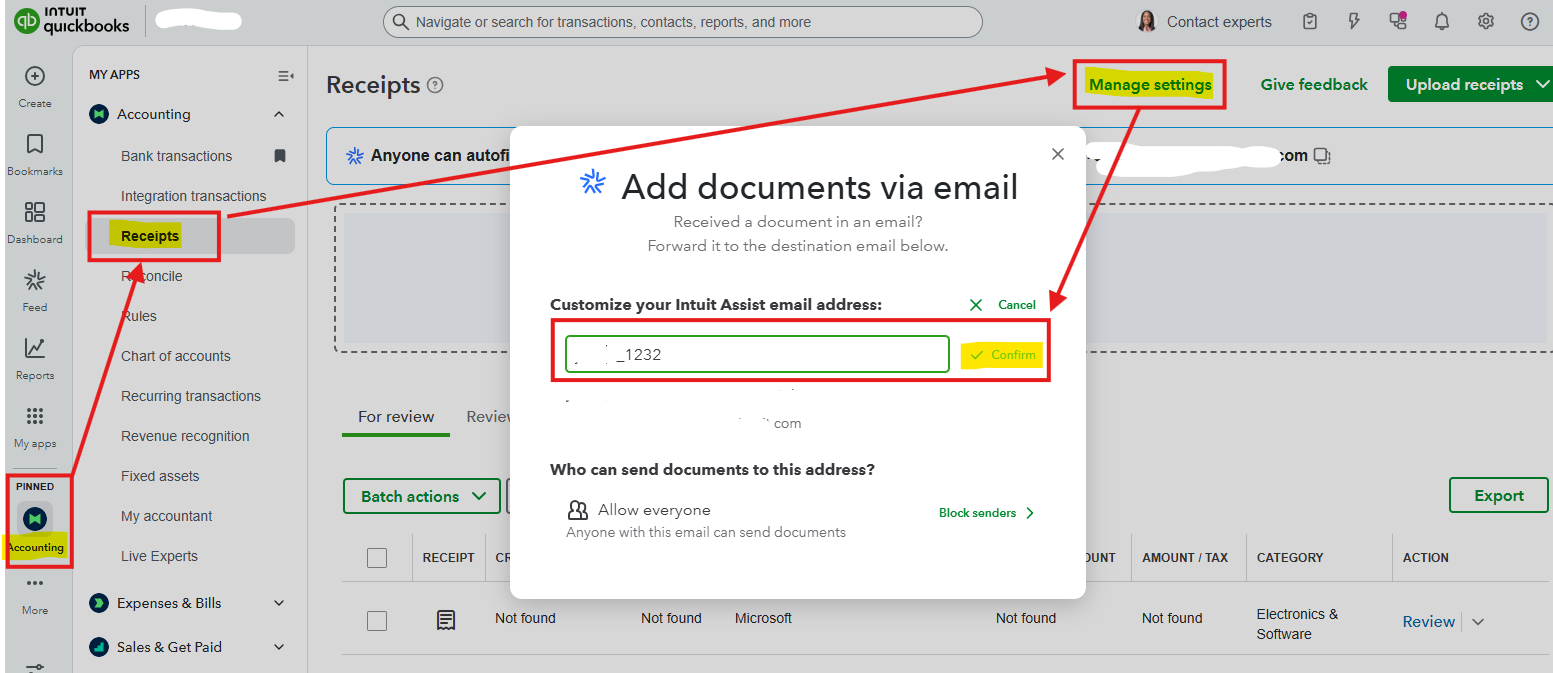
We can set up a unique email address for forwarding receipts in the Manage settings, located under the Receipts tab.


Here's how:


  1. Head to the Accounting tab, then Receipts
  2. Go to Manage settings
  3. Click Edit email
  4. Put your customized name with unique characters. 
  5. Click Confirm once done.


To automatically send bills and receipts in QuickBooks, follow the steps in this article on how to set up Gmail auto-forwarding to your created QuickBooks email address: Email receipts and bills.


If you need further assistance, please don't hesitate to ask.

JeraldR
QuickBooks Team

How to set up email for forwarding receipts

Hi, @homeworks.


Just checking in to see if the solution we shared worked for you.


Did it fix the issue, or are you still having trouble?


Happy to help if you need any more assistance!

Need QuickBooks guidance?
Log in to access expert advice and community support instantly.

Need to get in touch?

Contact us