Turn on suggestions
Auto-suggest helps you quickly narrow down your search results by suggesting possible matches as you type.
Showing results for
Get 50% OFF QuickBooks for 3 months*
Buy nowFor some reason I can no longer email invoices from one of my companies in QB 2021 desktop but I can in one of my other companies. Nothing has change with our email but when I try to email an invoice is says incorrect credentials.
Are both QB Companies using the same email? And how is it setup to send email, through Outlook or directly through the email providers settings?
And is it a company email account or something like Gmail, Yahoo ,etc.? You might check the security settings to make sure there wasn't a recent change to require dual authentication or some other limiting factor. If it's a common email account for more than just QBs, often people change the settings to make things more secure for their phone or whatever and don't realize they've affected QBs.
I have 2 different companies in QB. Each company has their own email and they are all yahoo accounts. I just recently upgraded my QB to the 2021 version. I haven't had any problems emailing out from company #1 until last Monday 02/15/21. I have no problem emailing from company #2.
The new upgrade required me to sign in. I put it off as long as I could. I had to create a new pass word due to I could not remember the old one. Could it be if I am not recognized as the owner administer if will prevent emails from going out? and if so, how do I change that?
Let's make sure that you can email your invoices without issues using QuickBooks 2021 version, CCates3115.
You'll have to recreate the email profile in your preferences so you'll be able to successfully send your invoices. Please follow the steps below:
Your webmail provider's login page will display. Sign in and select to grant Intuit access. In addition, if you add Secure Webmail to your company file, you’re required to set up a complex password.
You may encounter issues with your webmail password. Here's an article that you can check for more information: Fix webmail password issues in QuickBooks Desktop.
Reach out to us if there's anything else that you need help with your invoices. Remember, addressing all your concerns is our top priority, let us know if there's anything that we need to do.
I'm having very similar issue. One company can send a batch of invoices without issue. The other company can send a single email at a time just fine, but when trying to send a batch QuickBooks crashes every time. The first error message to come up says: "QBW32.EXE - Fatal Application Exit" click on that one and the next error message says: "Aborting Application: QuickBooks is now terminating". And QuickBooks closes completely down. We had no issues until we were forced to upgrade to the "new" and "improved" QuickBooks, now a major headache. Thanks a bunch...
I have uninstalled QB and reinstalled QB. Double checked settings til blue in the face. Made sure the logo was the "right" format, etc,etc,etc. Has anybody been able to fix this?
I'm having very similar issue. One company can send a batch of invoices without issue. The other company can send a single email at a time just fine, but when trying to send a batch QuickBooks crashes every time. The first error message to come up says: "QBW32.EXE - Fatal Application Exit" click on that one and the next error message says: "Aborting Application: QuickBooks is now terminating". And QuickBooks closes completely down. We had no issues until we were forced to upgrade to the "new" and "improved" QuickBooks, now a major headache. Thanks a bunch...
I have uninstalled QB and reinstalled QB. Double checked settings til blue in the face. Made sure the logo was the "right" format, etc,etc,etc. Has anybody been able to fix this?
I'm having very similar issue. One company can send a batch of invoices without issue. The other company can send a single email at a time just fine, but when trying to send a batch QuickBooks crashes every time. The first error message to come up says: "QBW32.EXE - Fatal Application Exit" click on that one and the next error message says: "Aborting Application: QuickBooks is now terminating". And QuickBooks closes completely down. We had no issues until we were forced to upgrade to the "new" and "improved" QuickBooks, now a major headache. Thanks a bunch...
I have uninstalled QB and reinstalled QB. Double checked settings til blue in the face. Made sure the logo was the "right" format, etc,etc,etc. Has anybody been able to fix this?
Hi @Moongerm,
I appreciate you for providing detailed information about your issue in QuickBooks Desktop. I would feel the same if I encounter these errors after upgrading to a more updated version.
I can share some troubleshooting steps to help you get back on track. You can start by updating QuickBooks to the latest release version. It will help ensure the software is up-to-date and have the latest components.
Here's how:
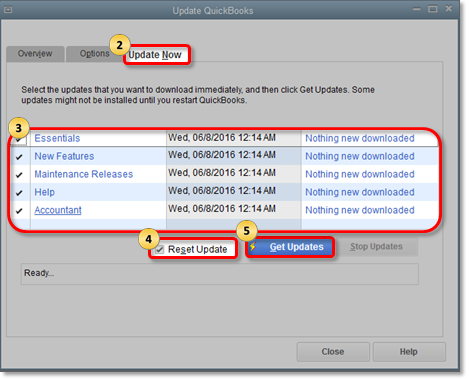
Once done, I recommend you download and run the QuickBooks Tool Hub software. It will help detect and resolve common issues going on with your company file.
Please follow these steps:
Also, you can run the QuickBooks Install Diagnostic tool from the Tool Hub to automatically diagnose and fix issues with Microsoft components the QuickBooks program uses. Here are the steps:
After performing the steps provided above, send a batch of invoices again. You should be able to send them successfully without QuickBooks crashing.
If the problem persists, please get in touch with our QuickBooks Support Team. They can check your account and assist you further with the problem happening to a specific company file.
You can reach them through these steps:

I've also attached an article you can use to know how to fix an error you encounter during a QuickBooks repair: Repair your QuickBooks Desktop for Windows.
Drop me a comment below if you have any other questions or concerns about sending invoices in QuickBooks. I'll be happy to help you some more.
How can I send my invoices out if after I put in my password for my email it says it it is not valid any more. Please help
I understand your situation and know that this is something very important to you, @Sharzak. I'm here to help you perform the possible fixes to your concern.
We can update QuickBooks Desktop this way, keeps your software up-to-date with the latest features and fixes. Once done, email a test transaction to yourself, to see if the update works.
If you still get the same error message, let's check the settings and filter preferences of the basic email services you're using like, Gmail and Yahoo! mail. You might accidentally block your emails from QuickBooks.
For Gmail, here's how:
But if your using Yahoo! mail, you can go to your Yahoo Account Security page and review the security settings. Then, turn on the Allow apps that use less secure sign in and Two-step verification features. Once done, email yourself with test transaction in QuickBooks.
You can also use Yahoo's generate third-party app passwords tool. It will create a random password you can use to connect to QuickBooks. Then, email yourself a test transaction in QuickBooks. In the Password field box, enter the third-party app password. Then select OK.
If you're using other email services, still check the security and filter settings, then make exceptions or rules so QuickBooks isn't blocked.
When you're done with all these steps, let's check your antivirus settings. Your antivirus software may accidentally block the connection. Please proceed to the step 3 of this article: Fix webmail password issues in QuickBooks Desktop.
Feel free to get back if you have clarification with the troubleshooting process and if it works on your end. I'll be around. Take care!


You have clicked a link to a site outside of the QuickBooks or ProFile Communities. By clicking "Continue", you will leave the community and be taken to that site instead.
For more information visit our Security Center or to report suspicious websites you can contact us here


