Hello there, @Frank90. Thank you for taking time posting in the Community. I can share some details about the error you've received during your importing process in QuickBooks Online (QBO).
The error can be caused by something such as, the added column, unaccepted symbols, or file of the source document that Intuit couldn't convert.
I recommend checking the document and compare it. Then, correct the details in it. Take out the header and the notes in the sample file. This is what the CSV data should look like before importing it to QBO:
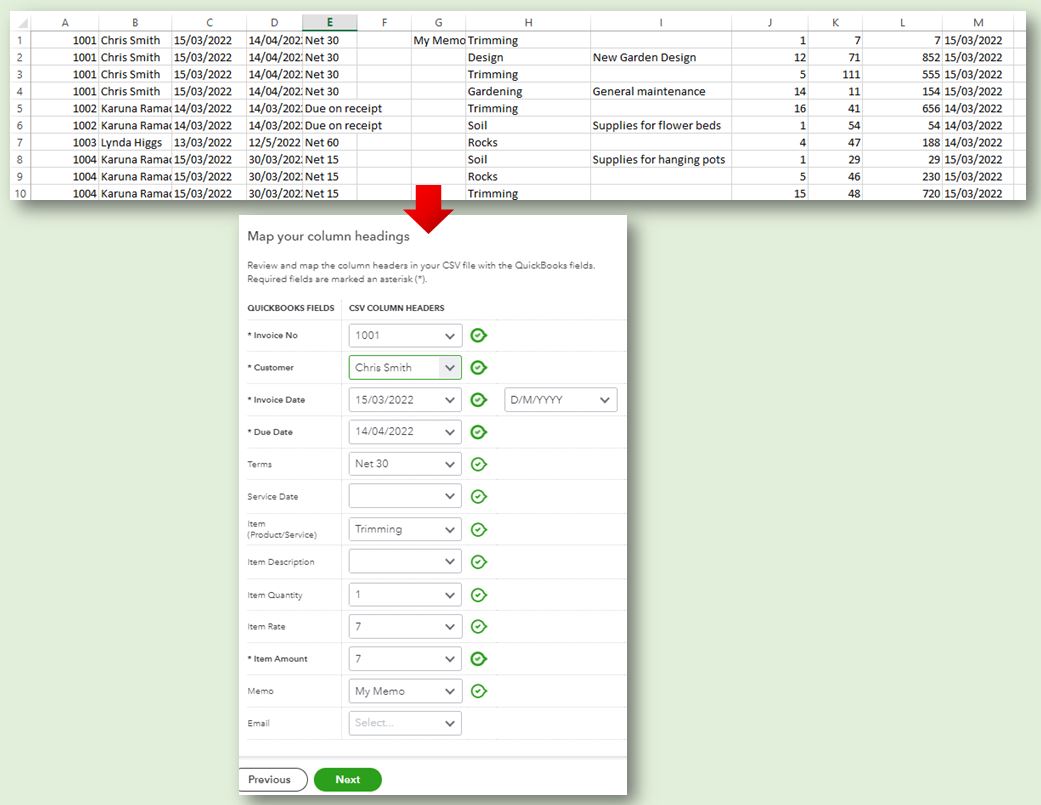
For more details on how to import invoices, you can check out this article: Import multiple invoices at once. It contains complete steps from the document to mapping the items.
I’ve also included this reference if you need to add specific information to your sales forms: Customize invoices, estimates, and sales receipts in QuickBooks Online. It has instructions about changing email messages and set up a default customized template.
You can always reply in the comment section if you need further assistance about importing invoices in QBO. I'm always here to guide you. Have a good one!


