Turn on suggestions
Auto-suggest helps you quickly narrow down your search results by suggesting possible matches as you type.
Showing results for
Get 50% OFF QuickBooks for 3 months*
Buy nowUpon noticing an unapplied "credit" under a vendor account, I discovered that an earlier payment to this vendor had been applied with vendor early pay discounts to several invoices. In reality, this vendor does not offer any early pay discounts.
What is the best way to journal the prepay discount out without deleting the original transaction (occurred in 2022) ? QB had automatically assumed and applied early pay discounts when the payment was applied, bringing down each applicable invoice by the discount amount, and thus leaving an open credit balance that doesn't exist. I would like to try to capture the amount back to each of the original invoices if possible.

Welcome to the Community, @JL1234. I appreciate the details you've shared.
I know this could be cumbersome to account for the amounts in a journal entry from the early payment discount/credit applied to a vendor account. In your case, I recommend consulting your accountant for accounting advice. This way, you'll know the best way to account for this in a journal entry and have error-free books.
On the other hand, you can run the Transaction List by Vendor report to show the credits or discounts applied to a bill-payment check expense or check expense. Then set or customize the Dates to when you created these credits and expense transactions.
Here's how:
While looking into this, you can now determine what vendor discounts or credits you applied to the payment. Please see the visual reference below, where I indicate red as the credit, bill, bill-payment check and green for the discounted bill and bill-payment check with a split (discount):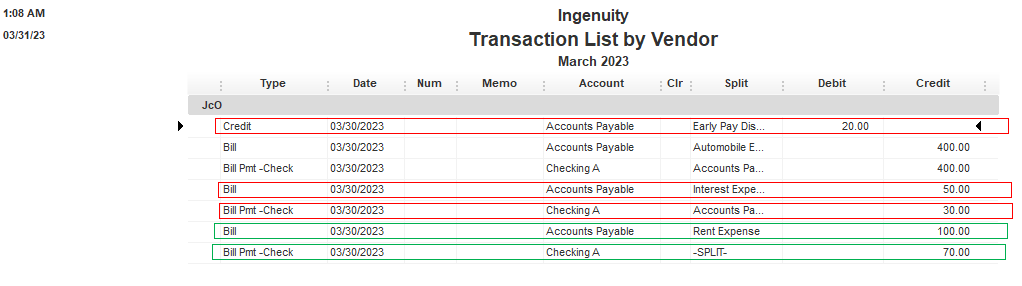
In addition, you might consider changing your preferences for vendor billing. You'll want to follow these steps:

Moreover, you can reference this article to learn more about filtering and showing the right report columns and details: Customize reports in QuickBooks Desktop.
Please let me know if you have other report-tracking concerns. I'll make sure to help you out more. Take care, and have a prosperous business!
Thank you. I was able to identify the specific bills and payment discounts applied. I was just wondering the best method to cancel this early pay discount out, and restoring that amount back to the materials account that it applied to. Any thoughts on the best method for this?
Let me begin the process with you, @JL1234. I'll explain how to remove the early pay discount applied to the bill in QuickBooks Desktop.
We need to delete the payment linked to the bill. This way, the credit will be unapplied.
Next, recreate the payment. This time, the credits for this new transaction don't need to be applied.
Your cash flow is the amount in and out of your business and bank account. In QuickBooks Desktop, you can use reports to view your current and future business finances. Know what to do: Track your cash flow in QuickBooks Desktop.
There you go, @JL1234. Kindly notify me how it goes after trying the possible solutions above. Thank you for visiting us.


You have clicked a link to a site outside of the QuickBooks or ProFile Communities. By clicking "Continue", you will leave the community and be taken to that site instead.
For more information visit our Security Center or to report suspicious websites you can contact us here


