Turn on suggestions
Auto-suggest helps you quickly narrow down your search results by suggesting possible matches as you type.
Showing results for
Get 50% OFF QuickBooks for 3 months*
Buy nowHi, when I snap an invoice on my phone and then go onto my computer it has doubled up. This happens with 90% of invoices. Hope someone can help. Thanks below is a picture of what is happening.

I can see your dedication to accurately recording all your external transactions in QuickBooks Online (QBO), @reen2. This commitment reflects your pursuit of excellence in business practices. I'm here to assist you in handling your doubled transactions when using the snapping feature in QBO.
Thank you for the screenshot; it helps me fully grasp your concern. To prevent future duplication when snapping an invoice, I recommend troubleshooting your mobile app to resolve any existing issues that cause duplicating your entries. Let me guide you through the process:
For Android
For iOS
In the meantime, you can manually delete duplicate transactions to prevent errors and inconvenience in your transaction management. Here's how to do it:
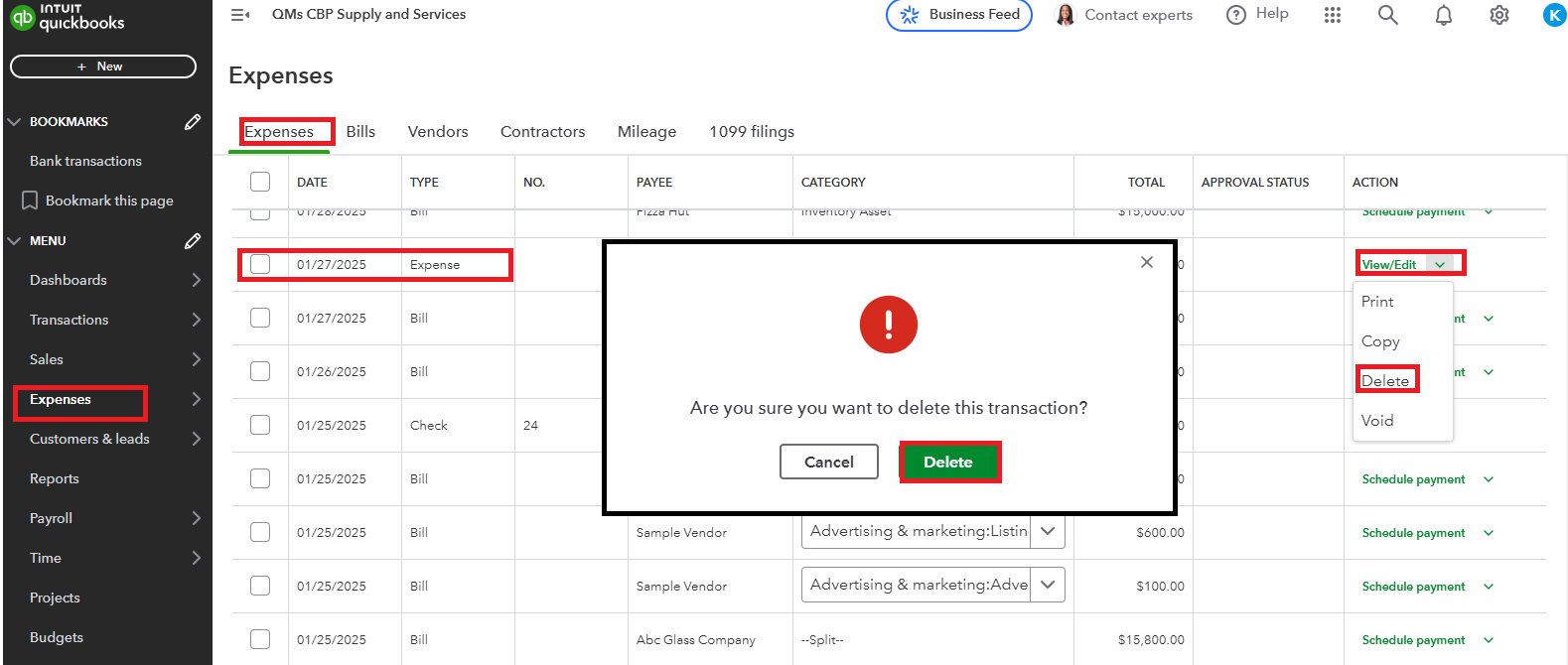
For enhanced management of your expense transactions in QBO, you can check this article for additional guidance: Enter and manage expenses in QuickBooks Online.
Additionally, remember to reconcile your accounts in QBO to ensure they align with your bank and credit card statements.
As you work to ensure accurate transaction recording, remember that I am here to help. Don't hesitate to reach out with any questions. Your commitment to financial management is admirable, and the Community is here to support you on this journey.
Hi I tried what you said “off loading the app” I then went and snapped a new invoice and it doubled again on my computer.
@KayePe Hi I tried what you said “off loading the app” I then went and snapped a new invoice and it doubled again on my computer.
It appears that the invoice duplication problem persists even after offloading the app. I appreciate your efforts in trying to resolve it. Let me route you to the next available support to help you address queries when managing your invoices.
As the Community is an open forum and we need to gather your personal information for a thorough investigation, we suggest contacting our Live Expert Team again to access your account. They have the necessary tools to analyze your situation and help resolve any errors, enabling you to create custom emails and issue receipts without any issues.
Here's how you can reach them out:
Please review our support hours to ensure we can assist you promptly with your concerns.
You can also consider utilizing mileage tracking to keep track of your trips and vehicle info during the year, so you have everything you need to make deductions at tax time.
Should you have more questions about managing invoices or any QuickBooks-related concerns? Kindly get back to us by clicking the Reply button below. And I will be here ready and eager to help you out.


You have clicked a link to a site outside of the QuickBooks or ProFile Communities. By clicking "Continue", you will leave the community and be taken to that site instead.
For more information visit our Security Center or to report suspicious websites you can contact us here


