Turn on suggestions
Auto-suggest helps you quickly narrow down your search results by suggesting possible matches as you type.
Showing results for
Get 50% OFF QuickBooks for 3 months*
Buy nowis it possible to have the TOTAL, the AMOUNT RECEIVED, and the BALANCE DUE on the printed QB invoice?
Our current printed invoice only shows PAYMENT and BALANCE DUE.
It's great to see you in the Community, scarylarry.
I recognize how important it is for your business to show the items mentioned above. It allows you to see the payment details applied to the invoice. I'm here to help and guide you on how to achieve your goal.
Yes, it's possible to show the total, payment, balance due, and amount received line items. We'll have to configure the invoice setup to ensure you'll see the details mentioned above.
Here's how:
If you're using the Standard template, make sure that you didn't select the Show on invoice function. Also, you can refer to the payment amount to know the amount received for the invoice.
In addition, utilize the solutions in this guide to tailor the look and data displayed in your sales forms: Customize invoices, estimates, and sales receipts in QuickBooks Online
In the event, you wish to inform your customers of their outstanding balances or include a specific field to sales forms, browse through each link to guide you through the process:
Reach out to me again if you have additional questions on how to customize the information on your invoices and other sales entries. I'd be delighted to lend a helping hand. Enjoy the rest of the day, scarylarry.
Hi there, scarylarry.
Allow me to clarify some information and ensure that your invoice shows the necessary information that you need in QuickBooks Online.
Based on what I've replicated and the screenshot you provided, I can confirm that you're indeed using the Old layout template for your invoices.
In the old layout, it allows you to customize sales forms such as content, tables, and designs. This includes the ability to show your customer's Account summary, which is currently unavailable in the modern design's customization options in the new invoice layout experience.
Therefore, to ensure that the total amount due, amounts received, and the current balance due, you'll need to make sure that the option "Show on invoice" in the Content tab for your invoice template that you're using is checked.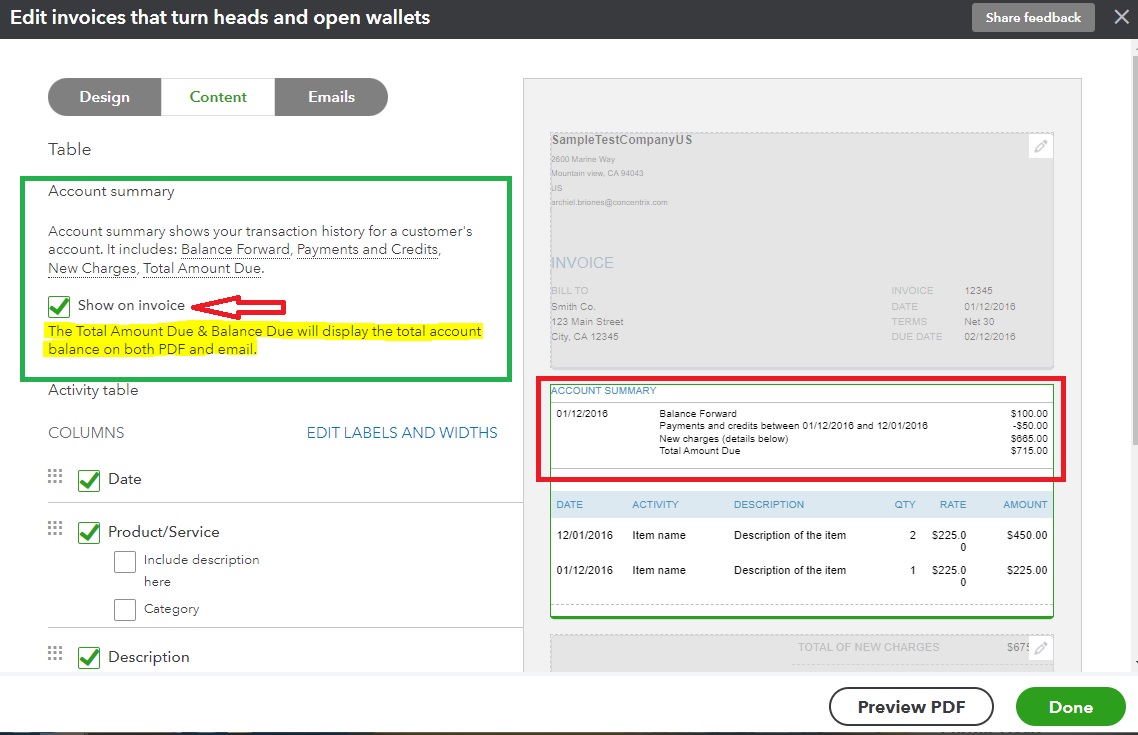
By doing so, you should have the account summary included when printing the invoice. Like this:
I've added the following articles for more information:
Feel free to return to this Community thread if you have follow-up questions or other invoice-related concerns. I'll be here to assist. Have a great day!


You have clicked a link to a site outside of the QuickBooks or ProFile Communities. By clicking "Continue", you will leave the community and be taken to that site instead.
For more information visit our Security Center or to report suspicious websites you can contact us here


