Turn on suggestions
Auto-suggest helps you quickly narrow down your search results by suggesting possible matches as you type.
Showing results for
Get 50% OFF QuickBooks for 3 months*
Buy nowIs it just me or does anyone else think the new fly-out menu is pants?
It's absolute rubbish - Doesn't work when you reorder bookmarks, tried 4 times and selecting save once made choices doesn't save or change anything, fly out menu pants and doesn't create any more space just pings back and forth annoyingly, no option to lock it in place....

I wish you didn't have to go through this, ZestPrint.
The unexpected behavior in the QuickBooks Online menu can be a browser-related issue. The stored cache can affect the performance of the program.
I'd recommend logging in to your QuickBooks Online account via a private window. This is an excellent place to determine if there's an issue with the browser.
Here are the keyboard shortcuts:
Once logged in, try using the new menu again. If it works, let's clear the browser's cache to improve the program's performance.
You can also use other supported browsers if private browsing doesn't work.
Additionally, I've added an article that'll show you what tasks you can do using the menus and how to customize them to best meet your business needs: Understand the Navigation Menu.
Please keep us posted if you need assistance navigating and using the tabs and menus. It's our priority to ensure the program works well.
Actually, @CharleneMaeF It is the new interface, which SO many users have been complaining about ALL week long. Nothing is working as it should. The developers have TOTALLY screwed it up.
There is no way to pull up recent sales!!!!!!! or deposits from the main menu!!!
I have to select "new sale" then pull up history...Its horrible!!!
All menu options for sales or deposit just drive me to some new link
This is HORRIBLE!!!!!!!!!!!!!!!!!!!!!!!!!!!!!!!!!!!!!!
I don't want you to feel this way, Tndm.
I want to help you navigate and get used of the the new functions and features in QuickBooks. Your account is may be on a Business view, that's why the terms and processes are new to you.
To view recent sales, you can select Business overview from the left menu. Then, choose the Sales box to open the Sales by Customer Detail report. I'm adding this screenshot as your visual guide.
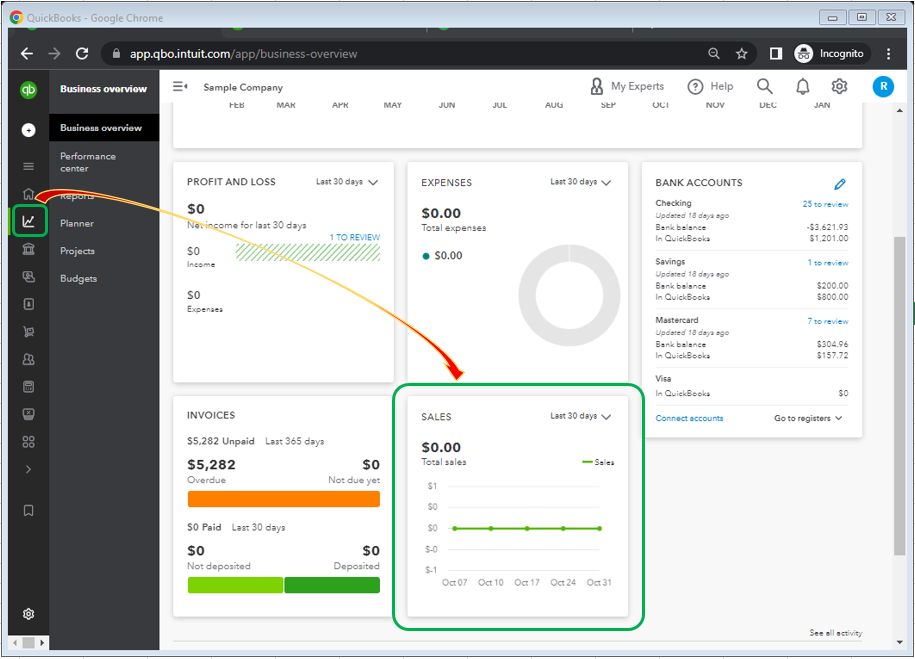
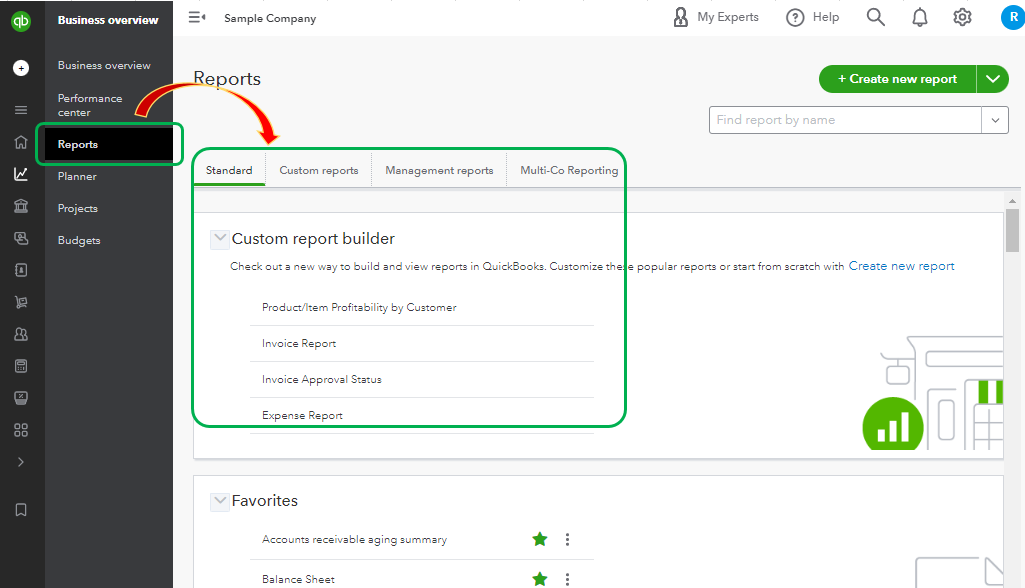
You can also select Reports and open the desired statement needed for your business needs.
Another way to pull up your sales is through the Bookkeeping menu. From here, you'll see recent downloaded transactions or create new transactions. I'm also adding a screenshot below.

Please know that there are two ways to display your account. You can browse this article to learn more about this: Switch between Business and Accountant view in QuickBooks Online.
Stay in touch with me by commenting below if you need more help with navigating the features on a Business view. I'll be right here to assist you.
OK, Thank you. That is better....There do seem to be more promotions threaded into things though like in Banking and commerce.... It is frustrating to be hit with advertisements when I'm already paying a monthly fee...


You have clicked a link to a site outside of the QuickBooks or ProFile Communities. By clicking "Continue", you will leave the community and be taken to that site instead.
For more information visit our Security Center or to report suspicious websites you can contact us here


