Get 50% OFF QuickBooks for 3 months*

Buy now
cancel
Showing results for 
Search instead for 
Did you mean: 
Announcements
Simplify payday and set payroll to run automatically on QuickBooks. Explore QuickBooks Payroll
Mdmx1324
Level 2

Progress invoicing for certain line items only

Hi.  I have an estimate for all services for the year (landscape business). I only want to invoice certain line items pertaining to when the work was performed.  I know how to set up progress invoicing and I know how to choose from the three options of billing.  Now, the invoice is produced with every line item from the estimate.  Do I have to "Unlink" each line that is not going on the invoice?  Is there an easier way to do this?  It is very time consuming each time I have to invoice for that customer.  Thanks for reading and sharing your thoughts.


1 Comment 1
LeizylM
QuickBooks Team

Progress invoicing for certain line items only

I understand the challenges you're facing when you only want to invoice for specific line items from an estimate in QuickBooks Online (QBO), Mdmx. 


Currently, this option is unavailable in QBO. As a workaround, you can create a new estimate specific to that item. 


I can see how the functionality to edit your remittance slip would be beneficial to your business. I'd recommend sending a feature request directly to our Product Development team. This helps us improve your experience and the features of the program. 


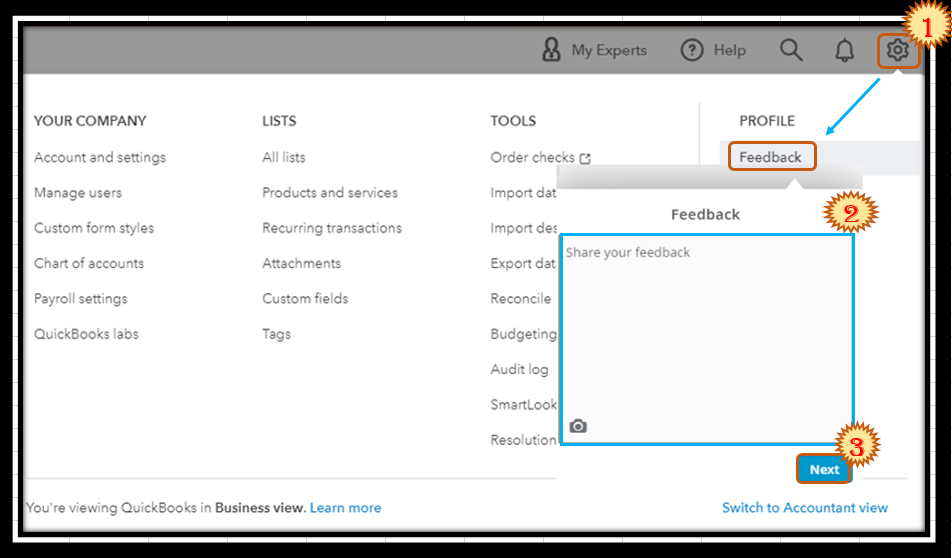
Here's how:


  1. Go to the Gear menu and then select Feedback.
  2. Type in your feature request in the description box.
  3. Once done, click on Next.
    Capture.PNG


You can also track feature requests through the Customer Feedback for QuickBooks Online website.


Furthermore, here are some articles to help you create personalize sales forms and modify your reports to show more details:


Please let me know if you have more questions related to progress invoicing or other concerns. I'm here to answer them. Have a great day!

Need QuickBooks guidance?
Log in to access expert advice and community support instantly.

Need to get in touch?

Contact us