Turn on suggestions
Auto-suggest helps you quickly narrow down your search results by suggesting possible matches as you type.
Showing results for
Get 50% OFF QuickBooks for 3 months*
Buy nowHi all, newbie here but been using QB desktop since 2005. Hired a new CPA and wanted me to get Online. Stuggleing some after using desktop for so long. My question is, after I purchased it and did the Migrating, I found I just didn't have time to fumble around the new layouts. Now that my CPA is ready I have to migrate a months worth on estimates and invoices again. I have no idea where to start and will it cause isses. Thanks in advance.

Welcome to the Community space, @rwwiefer.
Since you already did the migration process, your estimates and invoices will move to QuickBooks Online (QBO).
Please know that your active estimates are marked as closed and Inactive estimates are marked as Rejected. For your invoices, your logos will move, and the PO No field will move to Custom Field 1.
To learn more about this, please see this article: Learn how features and data move from QuickBooks Desktop to QuickBooks Online.
However, if you haven't migrated yet, we can follow the steps from this article on how to move your QuickBooks Desktop file to QuickBooks Online.
Additionally, let me share some details on how to get started in a QBO account where you can set up and navigate each field of your personal information. Please see this article for more information: Get started and adjust settings after you sign up for QuickBooks Online.
Moreover, you can check this article to learn how to personalize and add specific info to your sales forms: Customize invoices, estimates, and sales receipts in QuickBooks Online.
If you have other concerns about how to get started on your QBO account, don't hesitate to comment down below. I'm more than willing to help. Stay safe.
Hi Heide, yes, I did migrate a month ago. I didn't have time to learn the Online, so I kept working in desktop. Know I need to migrate again for my new CPA. How do I do that without duplicating everything. And can I continue to work in desktop and migrate as needed until I'm comfortable using online only.
We appreciate you getting back here in the thread, and providing more details about your situation, @rwwiefer.
There's no need to worry about having duplicates when migrating from QuickBooks Desktop (QBDT) to QuickBooks Online (QBO) again. The migration process will simply overwrite all existing data inside QBO and replace it with a new one. For more details, refer to this page: Move your QuickBooks Desktop file to QuickBooks Online.
You can continue using QBDT even after migrating to QBO. However, since it transfers all your data from one program to another in a single migration, you won't be able to transfer specific data anytime you want to.
Furthermore, we got this article to help you know more about what data can be migrated to QBO: Learn how features and data move from QuickBooks Desktop to QuickBooks Online.
It's been a pleasure to have you here today. We're always ready to help if you have follow-up questions about migrating data from QBDT to QBO. Don't hesitate to comment below so we can respond right away. Have a good one.
Thank you. I will read up on the info you gave me. I have been trying to customize the Est and inv section to look more like my desktop. How do I add columns. I need one that I can select color. I am a screen printer, and my estimate must include this box on each line.
See attached. If I am unable to set up like this then I will have to live with the dreaded accountants copy and go back to Desktop.
QB Online does not offer similar features as Layout Designer in QB Desktop. You may consider having a 3rd party inventory management app with the matrix inventory feature as a workaround to integrate with QBO. Otherwise, you should stay with QB Desktop
Hi rwwiefer.
Thank you for reaching out to us again regarding the ability to select colors for columns in transactions (Estimate and Invoice) within QuickBooks Online. I understand you want to customize the columns' appearance by choosing specific colors.
Currently, the option to select color for transaction columns is not available in QuickBooks Online. While you cannot add specific colors for columns, I want to assure you that adding columns to transactions is indeed possible within the platform.
Adding columns can provide flexibility and customization options for your transactions, allowing you to organize and present your data more effectively.
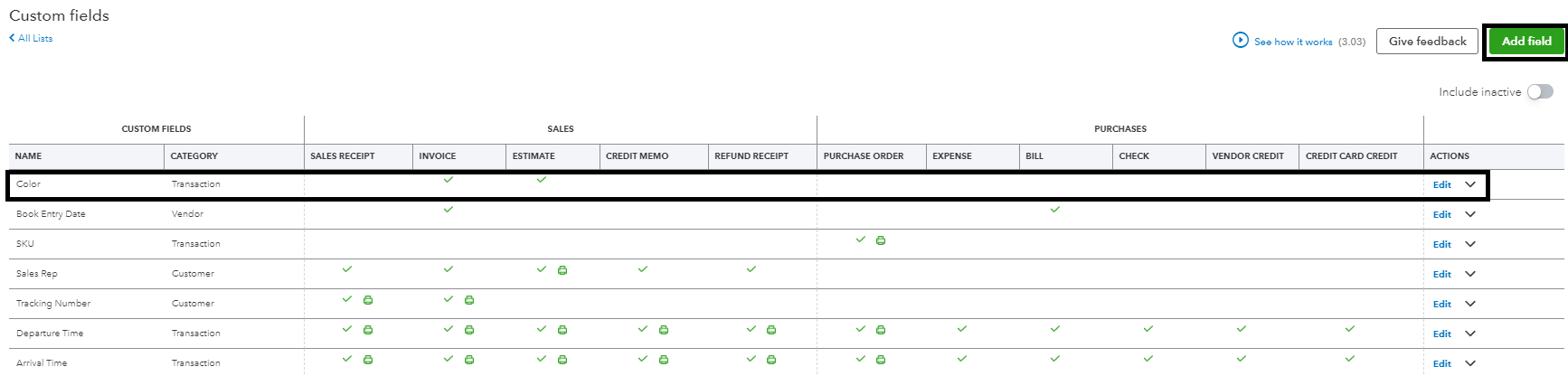
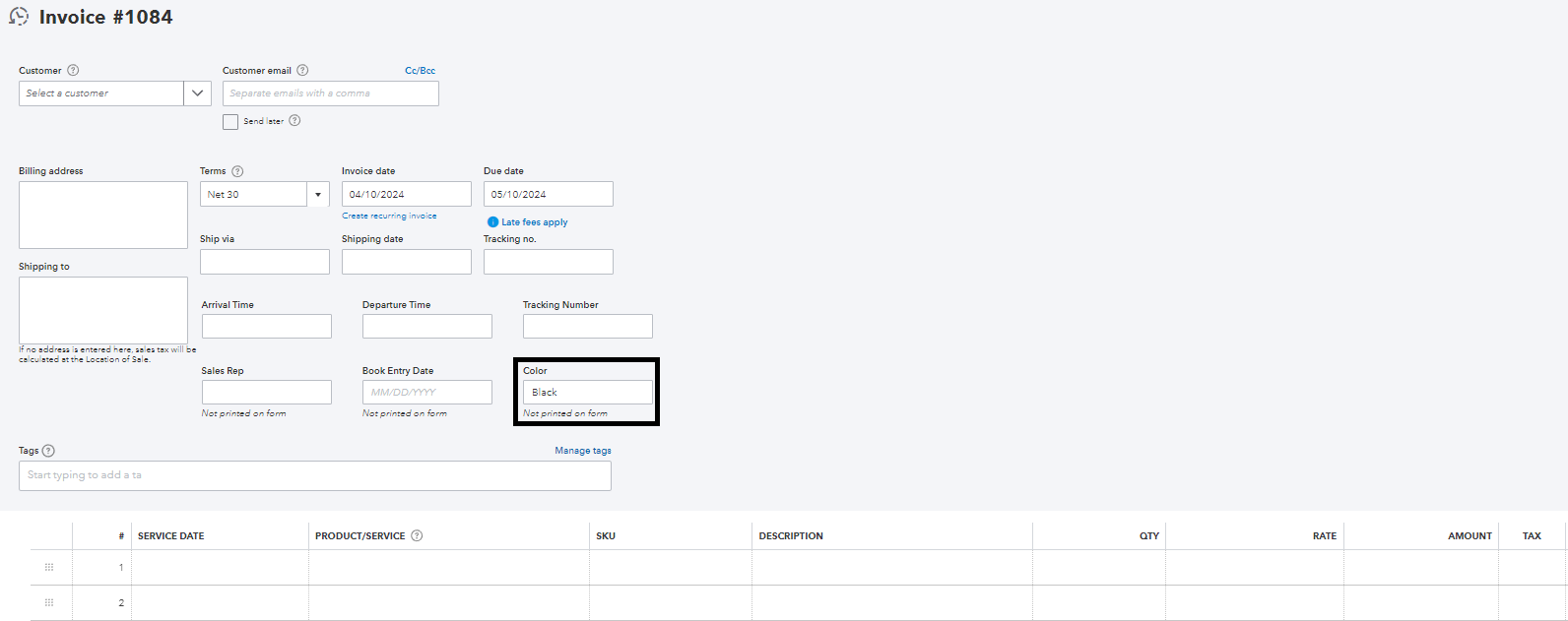
I understand that the ability to select colors for columns would benefit you. We appreciate your feedback and suggestions, as they play a vital role in developing and enhancing our product. To ensure your voice is heard, I encourage you to send your feedback directly to our engineering team by clicking the Gear icon and selecting the Feedback button within QuickBooks Online.
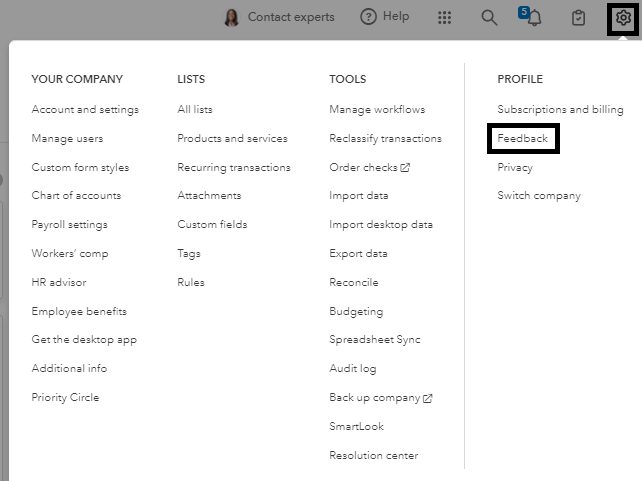
By providing your feedback, you contribute to the continuous improvement of our software and help shape its future direction. We are committed to providing the best user experience possible, and your insights are invaluable in achieving that goal.
Refer to this article for more information about customization: Customize invoices, estimates, and sales receipts in QuickBooks Online.
If you have any further questions or need assistance with any other features of QuickBooks Online, please feel free to reach out to us again here in the Community. We are here to help. Have a great day!
I'm sorry I'm making this confusing.
I need away to add a column or 2 to est and Inv. As a standard line item. For example I have thousands of products already in the List system (Desktop) .
Line item one will have a pull down to select the product, next column is description, next coulmn is quanities, next is size, next is color wanted, next is cost and last sub total for that line. How do I add columns ??
Hello there, rwwiefer. I acknowledge how relevant it is for you to efficiently personalize sales forms in QuickBooks Online (QBO).
The option to add columns in your invoice and estimate templates is unavailable in QBO. I suggest sending a feature request to our software engineers. They may consider taking it into account for future product improvements.
To submit feedback:
You'll want to consider looking for a third-party app to integrate with QBO and use it instead for managing columns. To find an app, visit this link: https://quickbooks.intuit.com/app/apps/home/.
You can also generate invoices over time while working off an estimate in QuickBooks. Please refer to this article: Set up and send progress invoices in QuickBooks Online.
Kindly drop by again if you have any more inquiries regarding your sales transactions or any other QuickBooks-related activities. I'm eager to assist you at any time. Keep safe.
I'm having exactly the same issue- Kind of want to abort mission, I don't feel like ill ever get it right.. Did you ever figure it out? Can I just do another migration or will it duplicate everything?
We want to ensure that your experience transitioning your data to QuickBooks Online (QBO) is seamless, KzoeBabbitt. Let me clarify how you can conduct another migration to QBO smoothly.
Before offering a precise solution to your issue, could you please provide more details about where you're encountering a problem? Additionally, as my colleague @Kurt_M mentioned. The migration process will overwrite all existing data in QBO and replace it with new data.
You can check this article for more details: Move your QuickBooks Desktop file to QuickBooks Online.
If you want to understand how your features and data move from QuickBooks Desktop to QuickBooks Online, feel free to check this article: Learn how features and data move from QuickBooks Desktop to QuickBooks Online.
Our team is diligently working on enhancing the correction feature to better suit your needs. If you have any more questions or need further assistance, especially about migrating data. Please click the Reply button to continue our discussion on this thread. I hope you have a pleasant day!


You have clicked a link to a site outside of the QuickBooks or ProFile Communities. By clicking "Continue", you will leave the community and be taken to that site instead.
For more information visit our Security Center or to report suspicious websites you can contact us here


