Get 50% OFF QuickBooks for 3 months*

Buy now
cancel
Showing results for 
Search instead for 
Did you mean: 
Announcements
Simplify payday and set payroll to run automatically on QuickBooks.Explore Intuit QuickBooks Workforce
Eric -TPA
Level 1

Quick Books Online Cash Flow Trend Widget

Has anyone had issues with Quick Books Online Cash Flow Trend Widget not working/syncing? 

It provides a graph or bar chart and normally a balance of daily cash flow in the upper left. But it now only gives me the graphs and no balance. I've tried clearing cache and using different browsers. Nothing works. 

Anyone have any solutions?

1 Comment 1
JoesemM
Moderator

Quick Books Online Cash Flow Trend Widget

I appreciate the steps you've performed to show the balance in your Cash Flow trend widget, Eric. 


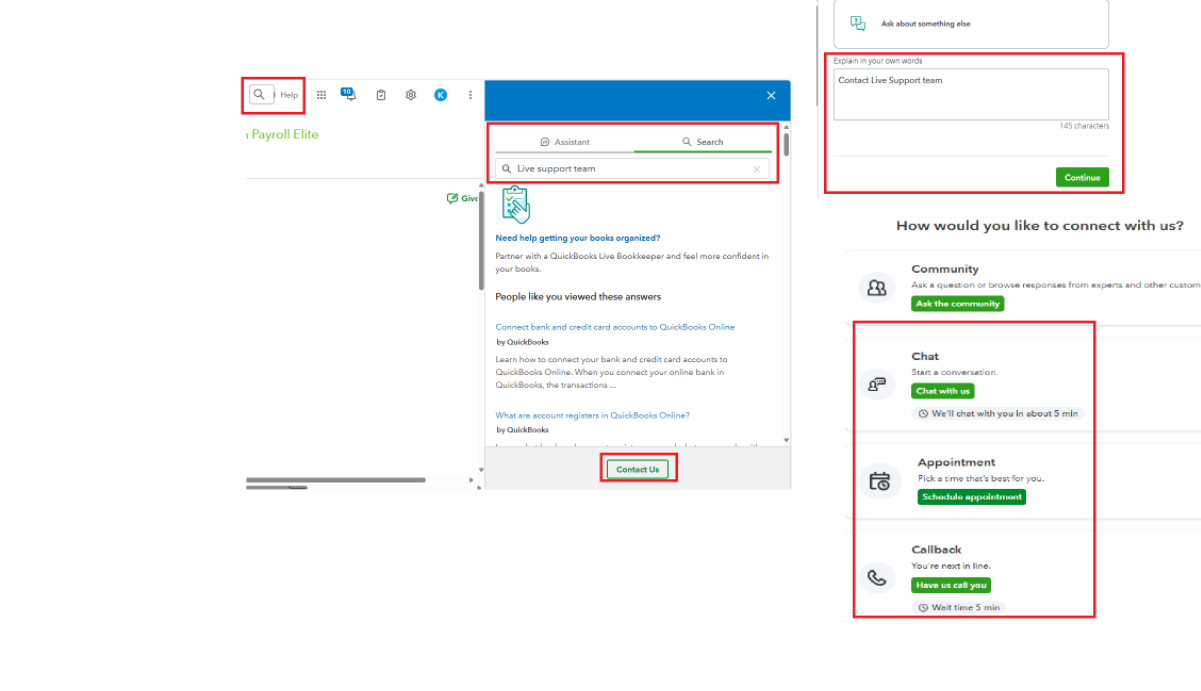
For further assistance, I encourage you to reach out to our Live Support team. They're equipped to look into this matter more closely and guide you on the best next steps.


Here's how:


  1. Go to the Help icon on the top menu.
  2. Select the Search tab and enter your concern. For instance, enter help.
  3. Click the Contact Us button.
  4. Enter your concern and click Continue.
  5. Choose between Chat, Appointment, and Callback to connect with us.
 

If you have any questions about your cash flow or need additional support, feel free to leave a comment below. I’m here to help you.

Need QuickBooks guidance?
Log in to access expert advice and community support instantly.

Need to get in touch?

Contact us