Hello, Mytheli.
I'll share some details about the availability of the Expiration Date feature in the QuickBooks Enterprise 2023 trial version.
The trial version of QuickBooks Enterprise (2023) includes and supports the new Expiration Date feature.
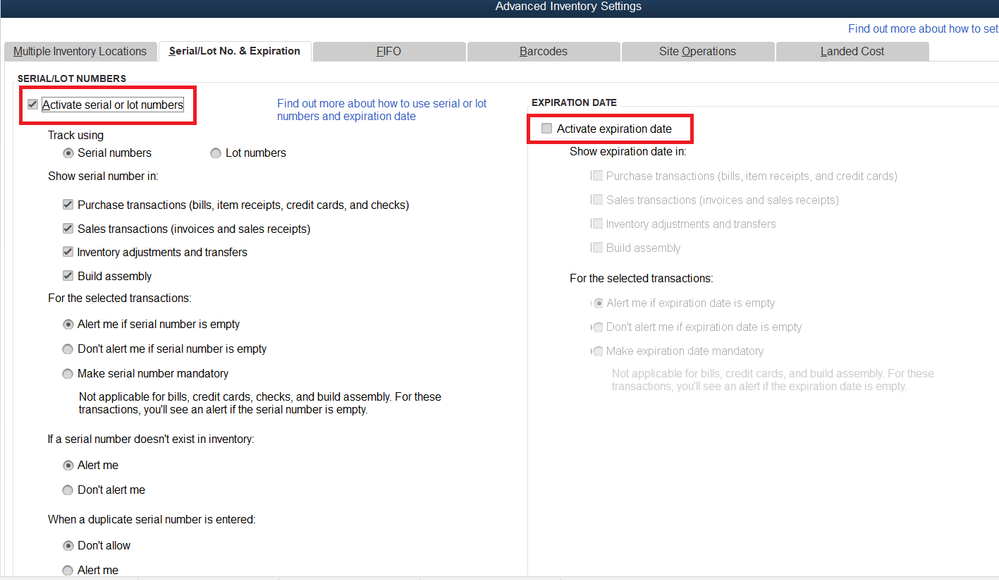
The feature can be found under Advanced Inventory Settings, as noted in your screenshot.
We'll want to check Inventory and purchase orders are active, then click on the Advanced Inventory Settings button.
From there, we'll want to go to the Serial/Lot No. & Expiration tab, then enable Activate serial or lot number. We will have the option to enable the Activate expiration date option, then set its settings.

if you'd like to know more about using the Expiration Date feature, feel free to take a look at this article: Use Serial or Lot Numbers and Expiration Date.
Do you need to keep track of your sales, inventory items, expenses, and other financial figures? We can run a number of reports in QuickBooks Desktop. Take a closer look at this article if you need help choosing what reports you can run: Understand reports.
Let me know if you have more questions about using the Expiration Date feature. If you also need help with your items, sales forms, and expenses, post the details below and I'll get back to you with the details and steps.


