I'm grateful for the detailed information you provided, Save_the_small_businesses. It's very smart to look forward to issues you could have and make changes that protect yourself. Effectively managing your clients' future expense bills is essential for nurturing strong business relationships. Let me explain and walk you through the process to ensure you handle it with confidence and precision.
To ensure a smooth billing process in QuickBooks Desktop (QBDT), I recommend establishing a clear agreement (to pay in advance, refund if overpaid, and bill again if underpaid) with your clients. This will cover the anticipated vendor charges, allowing you to provide them with a transparent and predictable billing experience.
With that, you can also collaborate with your accountant to guide you on how to properly track your transactions, safeguarding the precision of your financial data. This proactive approach not only enhances your client relationships but also empowers you with clarity and control over your finances.
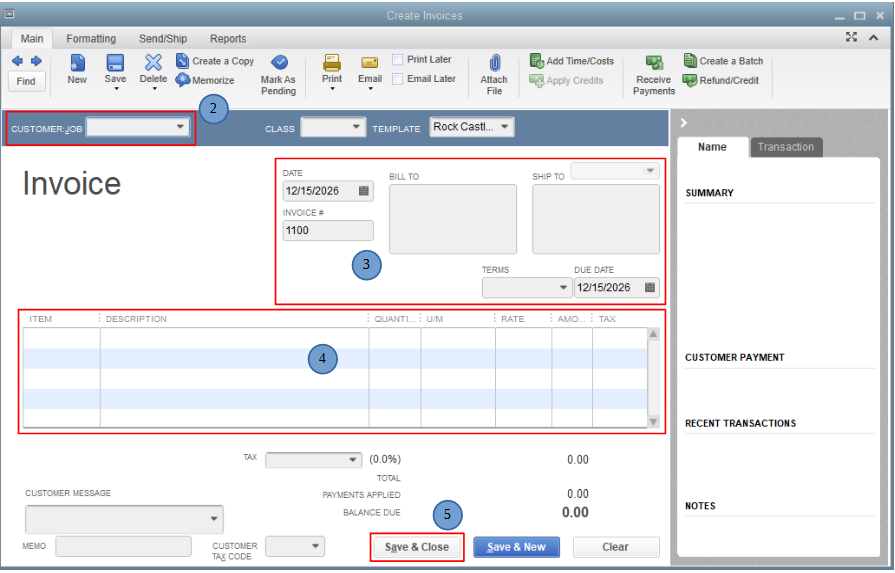
Once your customers agree, you can then create invoices for the estimated amount of their charges. To do this, follow these steps:
- Go to the Customers menu and select Create Invoices.
- From the Customer: Job dropdown, select a customer or customer job.
- Fill in the relevant information at the top of the form like the Date, Invoice #, Bill to, and Terms.
- In the detail area, select the item/s and enter the estimated amount.
- Click Save & Close.
In case you'll be giving refunds for clients' overpayments, check out Option 2 in this article to guide you through the whole process: Give your customer credit or refund in QuickBooks Desktop for Windows.
Additionally, would you like to explore the full range of workflows and customer-related transactions available in QBDT? I recommend checking out this article for a comprehensive overview: Track customer transactions in QuickBooks Desktop.
Don't hesitate to ask follow-up questions while recording your customers' future expense bills. We want to ensure that all your inquiries are resolved. We'd be glad to offer our help again.


