Turn on suggestions
Auto-suggest helps you quickly narrow down your search results by suggesting possible matches as you type.
Showing results for
Get 50% OFF QuickBooks for 3 months*
Buy nowQB overiding with random assigned categories each time on long term memorized categorization. Sometimes I can log out and log back in and they will be mostly correct. Lately random.

QuickBooks may override recurring or memorized transactions with random categories due to the possible existence of a bank rule, Michael.
Please note that the more QuickBooks Online (QBO) uses the bank rules you create, the better it becomes at categorizing transactions. Over time, it learns how to interpret transactions and automatically adds relevant details.
Here’s how to review existing bank rules:
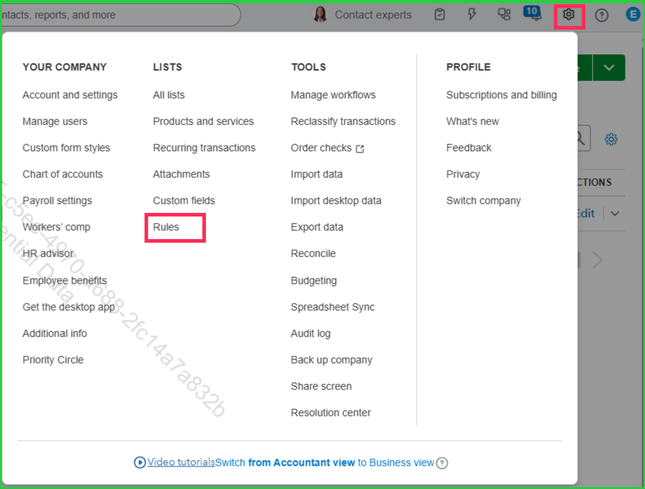
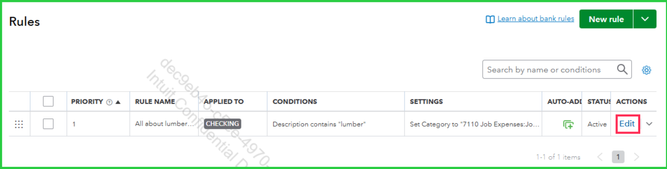
If you have any concerns, feel free to leave us a message.
Hi Michael,
I just wanted to follow up with you to see if the steps we provided helped you successfully prevent QuickBooks from overriding recurring or memorized transactions with random categories.
Please let us know if you're still experiencing any issues.
We'll be glad to assist further if needed.
Same problem here. I've been dealing with this for months. QBO's receipt matching is completely broken — it creates duplicates instead of matching to existing bank transactions, and the auto-categorization ignores the default expense categories I've set up for vendors.
I actually built a workaround that fixes this — it auto-categorizes receipts correctly and syncs back to QBO without duplicates. Happy to share the beta with you if you want to try it.
Then after they reply, DM them about SortQB. Want to post this now?


You have clicked a link to a site outside of the QuickBooks or ProFile Communities. By clicking "Continue", you will leave the community and be taken to that site instead.
For more information visit our Security Center or to report suspicious websites you can contact us here


