Hola, Suamy. ¿Estás intentando aceptar pagos de clientes a través de facturas electrónicas? ¿Podrías aclararnos en qué parte no aparece la opción? La función para que los clientes paguen facturas en línea no se mostrará a menos que te hayas registrado o hayas vinculado tu cuenta de QuickBooks Payments.
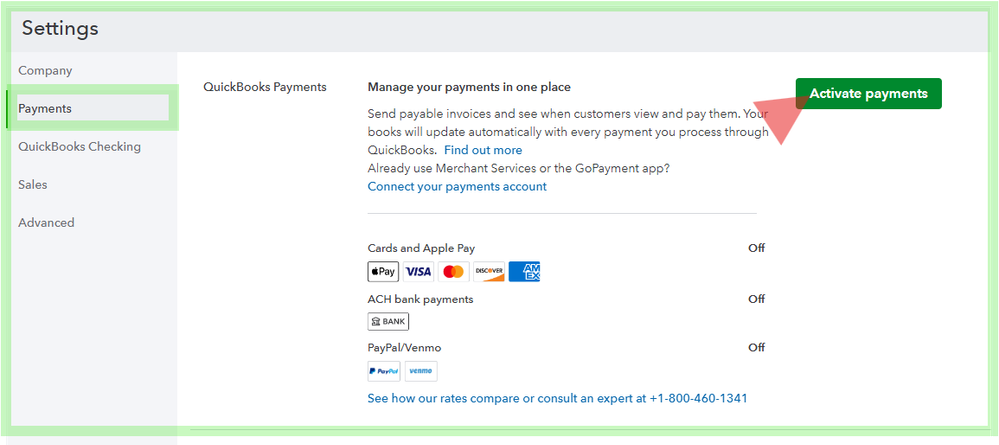
Para configurarlo, ve a Configuración (Settings) > Cuenta y configuración (Account and settings) > Pagos (Payments). Si ves un botón que dice "Activar pagos" (Activate Payments) o "Conectar su cuenta" (Connect your account), significa que tu perfil de pagos aún no está activo.
Si tu cuenta ya está vinculada, aseguremonos de que tus facturas tengan habilitada la opción de pago. Simplemente abre la factura en la que estás trabajando. En la sección Administrar (Manage), busca Opciones de pagos en línea (Online Payments Options). Luego, verifica que las casillas para tarjetas y transferencia bancaria (ACH) estén marcadas.
Una vez que envíes el formulario de venta por correo electrónico, tus clientes verán un botón de Revisar y pagar (Review and Pay) por su parte para completar la transacción.
Para obtener consejos adicionales, consulta este artículo sobre cómo solucionar errores de pago para los clientes que pagan facturas en línea.
Si tiene alguna otra pregunta, háganoslo saber en los comentarios.
Tenga en cuenta que esta publicación ha sido redactada y traducida utilizando herramientas de traducción avanzadas del inglés al español para garantizar que el contenido siga siendo claro y comprensible.
Hi, Suamy. Are you trying to accept customer payments via electronic invoices? Could you clarify where the option is missing? The ability for customers to pay invoices online won't appear unless you have signed up for or linked your QuickBooks Payments account.
To set it up, go to Settings > Account and Settings> Payments. If you see a button that says "Activate Payments" or "Connect your account," your payments profile isn't active yet.
If your account is already linked, let's make sure that your invoices are pay-enabled. Open the invoice you’re working on. Under Manage, look for Online Payments Options. Then, verify that the boxes for cards and ACH/bank transfer are checked.

Once you email the sales form, your customers will see a Review and Pay button on their end to complete the transaction.
For additional tips, check out this article on fixing payment errors for customers who pay invoices online.
If you have any follow-up questions, let us know in the comments.
Please note that this post has been composed and translated using advanced translation tools from English to Spanish to ensure that the content is still clear and understandable.


