Turn on suggestions
Auto-suggest helps you quickly narrow down your search results by suggesting possible matches as you type.
Showing results for
Get 50% OFF QuickBooks for 3 months*
Buy nowWhen I set up a member in quickbooks online, it seems I can only put in one email address for the member. Is it possible to add more than one email for a member. I want to see if I can send an invoice to two email accounts. I added an attachment here which is a screenshot of my attempt to put in two email addresses when setting up a new member or customer. I tried different ways, but it only accepts one email.
Can I have more than one so that when I mail an invoice, it will pick up both automatically?
Thanks!
It's great to have you here in the Community, @sledhead66.
Regarding your question, you can enter two email addresses for a single customer by separating each with a comma.
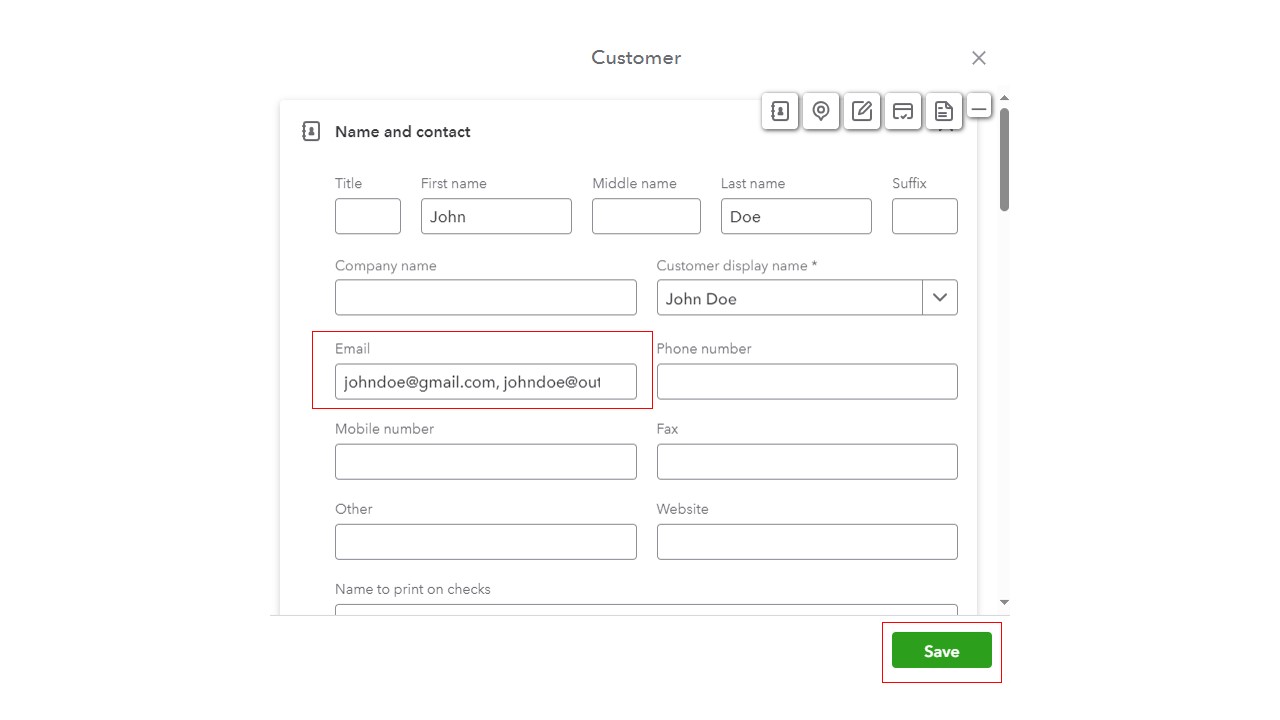
Here are some helpful articles that can guide you in emailing sales forms to your customers:
Just in case you need help in emailing your expense receipts and bills to QuickBooks Online (QBO), check out this article: Email receipts and bills to QuickBooks Online.
Please hit us up if you need further assistance adding a second email address for a customer. We're always here to back you up.
I got it to work, thank you very much!!!
Hi, @sledhead66.
On behalf of my colleague, jeanbiverly_, you're welcome. It's great to know that the recommendations above resolved your concern. The QuickBooks Community will always be around to lend you a hand any time you need guidance.
Feel free to post here anytime if you need assistance with QBO-related tasks. I hope you have a pleasant day ahead. Keep safe always!

You have clicked a link to a site outside of the QuickBooks or ProFile Communities. By clicking "Continue", you will leave the community and be taken to that site instead.
For more information visit our Security Center or to report suspicious websites you can contact us here


