I appreciate the interest in using the Get Signature feature on your invoices and estimates, cderose. I've got the details you need to get you back up and running.
Please note that the said feature is only available in the QuickBooks Online (QBO) mobile app for iOS devices. I've attached some screenshots for your reference:
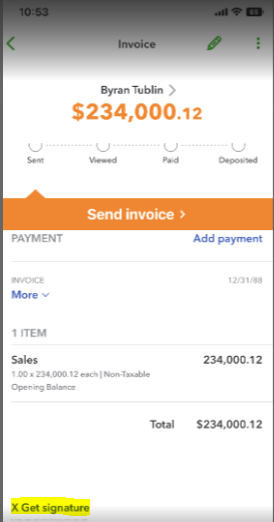

Based on your scenario, it sounds like you're using an Android device which could be the possible reason why you're not seeing the option on your end. If that's not the case, I recommend performing some troubleshooting to fix the issue.
First, make sure you're running the app on iOS version 11.1 or newer. After that, refresh your app so you can see the most recent information and fix weird behaviors, like missing features or options. Here's how:
- Go to Menu ☰ and tap Help & Feedback.
- Select Refresh Data.
- Tap Refresh to confirm.
If you still get the same issue, I recommend uninstalling and reinstalling the QuickBooks Online mobile application. This way, you have the latest fixes and prevent similar issues like this.
Moreover, you can review this article on how to record payments from your customers: Receive an invoice payment using the QuickBooks Online mobile app.
Please reach out if you need further assistance handling your invoices and estimates in the mobile app. I'm always around to help. Stay safe and well, Rose.


