Thanks for bringing this up to the Community forum, resurrection. Let me provide some troubleshooting steps to help you access the Search feature seamlessly in QuickBooks Online.
Since this is an unexpected behavior, it could be due to cache-related issues accumulated within your browser. Please know that cache can affect the program's performance and hinder users from using some features in the program. Thus, let's perform some troubleshooting procedures to eliminate this. You can start by opening your account in an incognito or private browser to ensure the issue is within your browser. You can proceed to these keyboard shortcuts depending on your browser:
- Google Chrome: Ctrl + Shift + N
- Mozilla Firefox: Ctrl + Shift + P
- Microsoft Edge: Ctrl + Shift + P
- Safari: Command + Shift + N
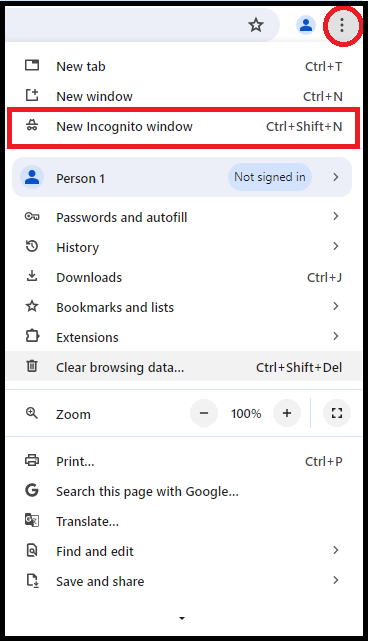
If the feature is already accessible via the incognito browser, you can switch back to your regular browser and clear the browser's cache to start with a clean slate.
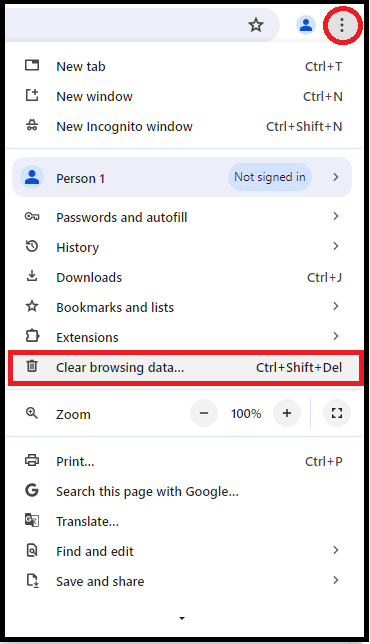
Alternatively, you can use other supported browsers or devices to access the program with the best and most secure experience.
In addition, if you need guidance on importing or exporting your customer or vendor contact lists from Outlook, Excel, Gmail, or Google Sheets, you can review this material: Import and Export customers or vendors from email contacts.
Furthermore, you may merge duplicate customers or vendors to keep your customer and vendor lists organized and managed.
Please notify us if there are any additional queries when accessing the search field or other customer and vendor- related concerns. We're here to help.


