Hi there, @PeterHo. I appreciate you using QuickBooks Desktop (QBDT) as part of your business.
The box showing Vendor Not Found means the vendor you entered is not on the list. The first thing we can do is to manually search for the name to verify it is on the Vendor List. I'll be laying out the steps below.
Here's how:
- Go to the Vendors menu and select Vendor Center.
- Type the name of the vendor on the search tab.
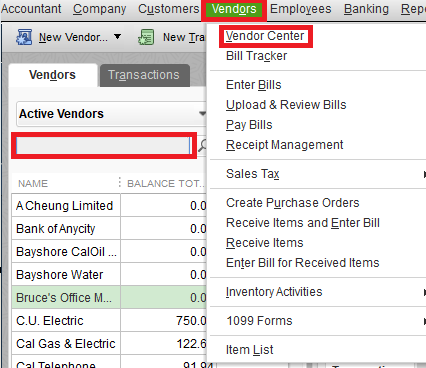
Once verified that the vendor is there, double-check if you entered the correct name of the vendor upon creating the transactions. It could be that you accidentally added identical information or characters to it.
If not, you'll want to ensure it was saved accurately. This way, you can seamlessly add transactions to it. I'll walk you through how:
- Go to the Vendors menu and click Vendor Center.
- From the upper left corner of the Vendor Center window, select New Vendor.
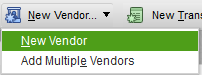
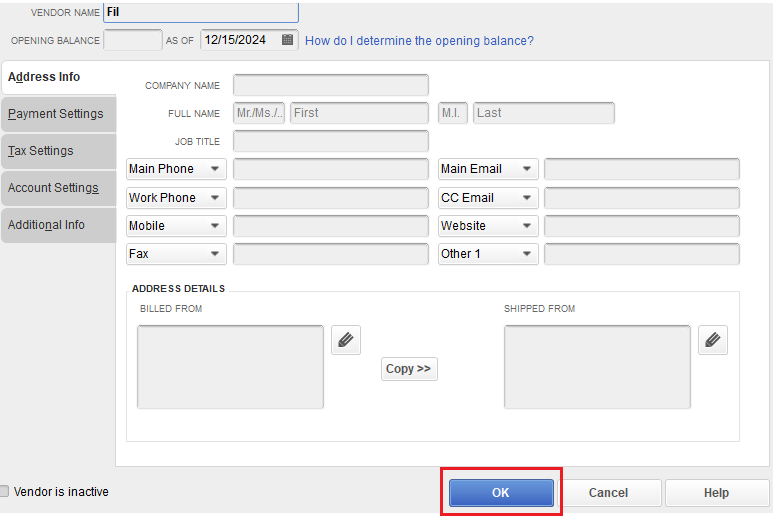
- Fill in the details necessary.
- Once done, ensure to click OK to save the information.
Otherwise, you can click Quick Add to automatically add it to the Vendor List.
Here's a reference where you can find articles about managing your vendor transactions: Enter expenses, pay bills, and write checks.
Moreover, I've got this article to personalize the ready-made reports that outline the current state of spending and accounts payable for your business: Customize vendor reports.
If you still need help with creating vendor transactions or other QBDT-related tasks, feel free to get back to this thread. I'll do everything I can to help here in the Community. Keep safe always.


