Turn on suggestions
Auto-suggest helps you quickly narrow down your search results by suggesting possible matches as you type.
Showing results for
Get 50% OFF QuickBooks for 3 months*
Buy nowHi. When I am viewing a list of transactions, e.g. from the vendor list, I click on a transaction to view it. It might open but then if I try to view another, it will not open. A message flashes at the bottom of the page, saying that it is waiting for something.

Thank you for reaching out to us, @PatoOax.
The error message you see when viewing transactions could be due to corrupted cache files in your browser. Let's perform a few troubleshooting solutions to isolate the issue.
You can begin by accessing QBO using a private window. Here are the keyboard shortcuts:
Once done, please view your transactions again. If the message prompt doesn't show up, clear the cache to fix the unexpected behavior in the product. If not, use other supported web engines to get the best and most secure experience with QBO.
You may visit these links to guide you on how to categorize your transactions and reconcile your account accurately:
Please comment down below if you need further assistance with your transactions. We're available 24/7. Have a great day!
Thanks. I could view the invoices when using a Chrome incognito window. I cleared the cache and cookies then tried from a regular Chrome window. I could open 1 invoice. When I tried to view another, same problem. So I guess the solution is to use qbo in an incognito window. Right?
Thanks for the update, @PatoOax.
Using an incognito window isn't the solution to your display error in QuickBooks Online (QBO). After clearing your cache, you should be able to view your list or transactions via the regular browser.
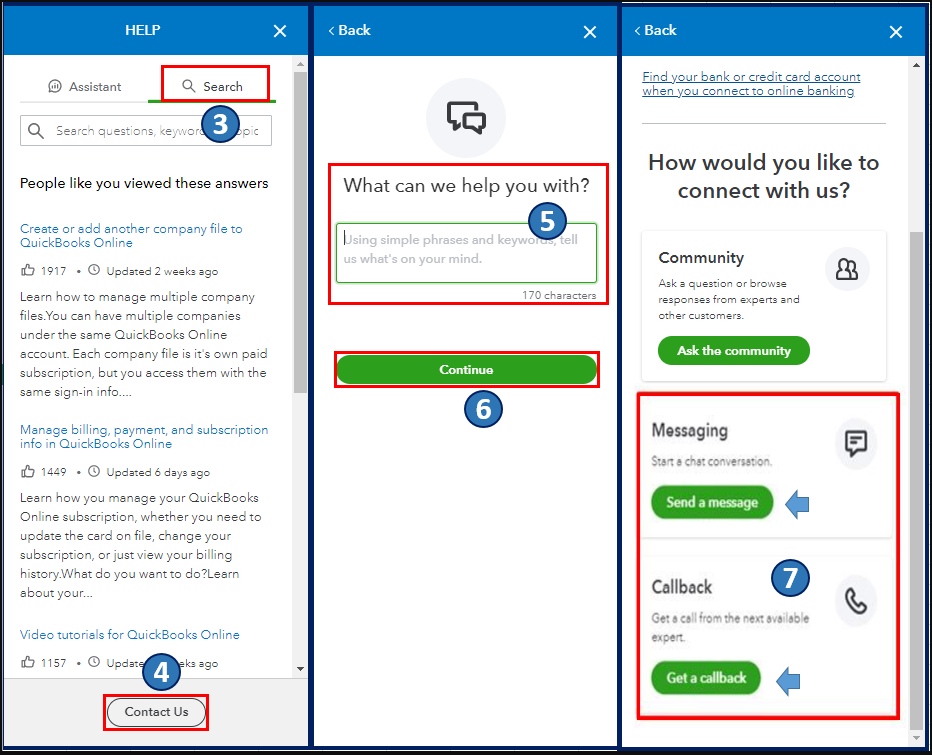
Since your viewing issue continues, even after performing the recommended troubleshooting steps, I encourage you to reach out to our Customer Care team. The Community is a public forum, and we'll need to collect some personal information to pull up your account. They can create a case to further investigate the error and guide you with a fix. Here's how:
Once everything is all set, you may also want to check out this article as your reference to guide you in pulling up and customizing financial reports based on the data you need in QBO: Common custom reports in QuickBooks Online.
Let me know if you have other concerns about viewing and managing income and expense transactions in QBO. I'm always ready to help. Take care, and have a great day, @PatoOax.
Clearing cache and cookies only worked for the next transaction I wanted to view. Then failed in the same way. I am using a Chrome incognito window as a work around but your Tech Support tells me that this is not a solution just a workaround. The problem was escalated but not resolved.


You have clicked a link to a site outside of the QuickBooks or ProFile Communities. By clicking "Continue", you will leave the community and be taken to that site instead.
For more information visit our Security Center or to report suspicious websites you can contact us here


