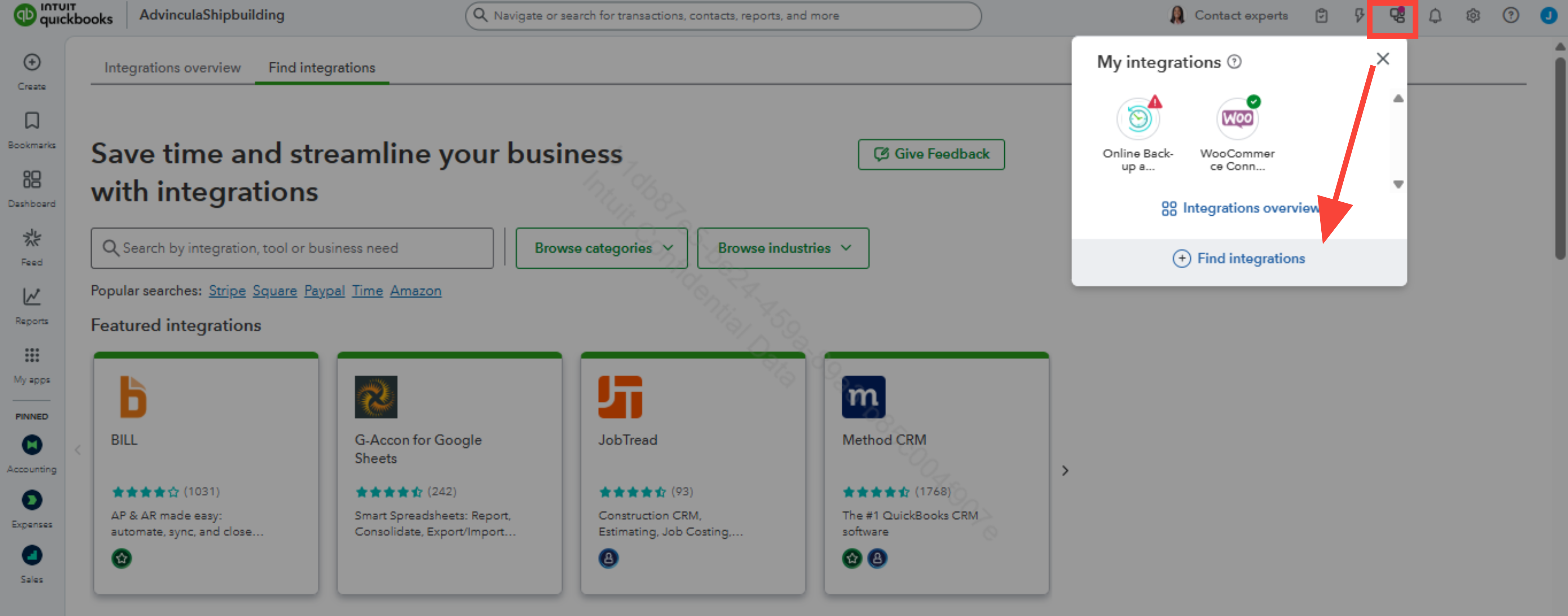
In QuickBooks Online, there is a feature called Snap Receipt that allows you to easily scan or upload receipts, but it is only available in the mobile app, @sbarlow1. Since you're looking for a specific receipt scanner that integrates with QuickBooks Online, you can explore third-party apps by selecting the Find integrations option to search for a receipt scanner.
Here's how to use the receipt snap in the QBO mobile app:
- Open the QuickBooks Online mobile app.
- Select the Menu ≡ icon.
- Select Receipt snap.
- Select Receipt camera and snap a photo of your receipt.
- Select Use this photo, then Done.
Here's how to find a third-party app for a specific receipt scanner:
- In the upper corner, click the icon next to the bell icon.
- Then, click on Find integrations below.
- In the search bar, enter the information you wish to find.
You can also check out this article on how to upload your receipts to QuickBooks Online from your computer or mobile device: Upload your receipts.
You can return here whenever you need assistance.


