Hello there, KGorski. We need to ensure that there are no other transactions related to or linked to this invoice. Once you have applied the payment amounting to $111.15, it should be marked as Paid and closed out to zero.
To verify this, let's go to the Customer Center under the Customers tab. Select the specific customer to view their transactions. Next, locate the invoice and double-click it. It will take you to the Invoice page. Click on the Transaction tab to view the associated transaction under the Related Transactions on the specific invoice. If there are related transactions in addition to the $111.15, that is the reason for the calculation you are seeing on your end.
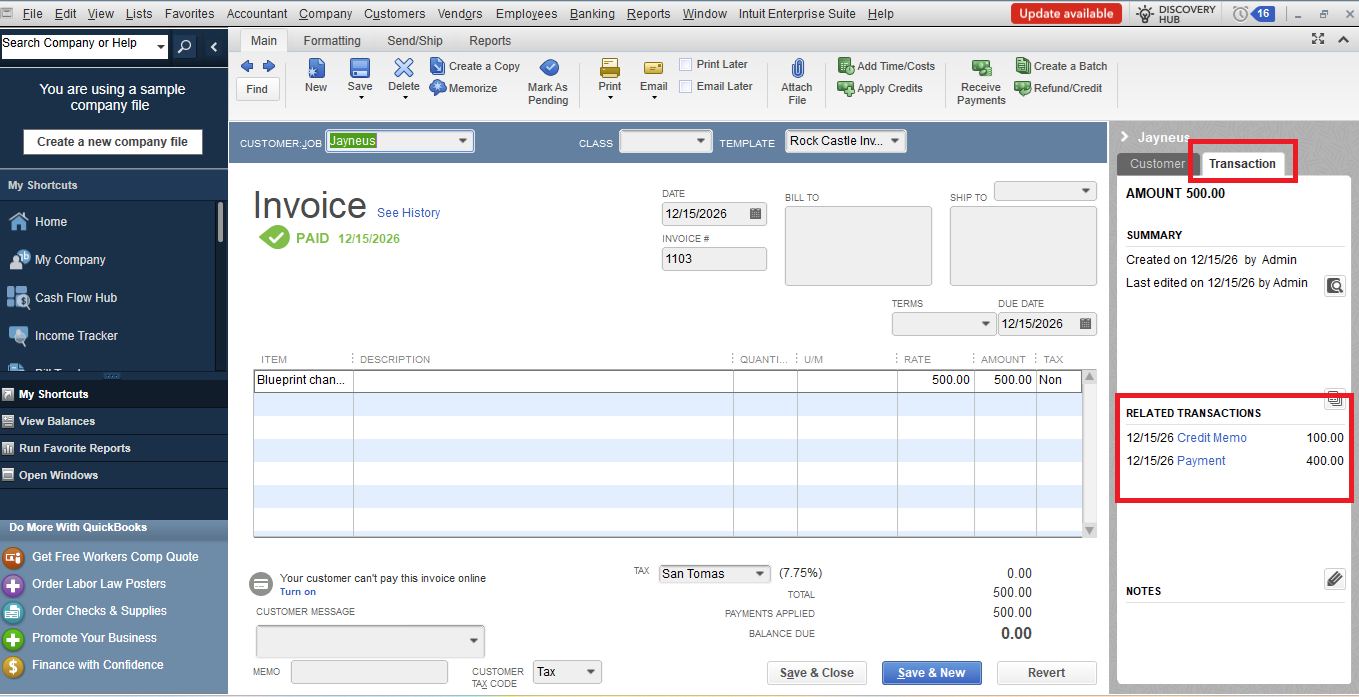
To resolve this issue, delete the invoice and create a new one, then apply the payment of $111.15. This process often eliminates any hidden links associated with the original transaction.
If there are no related transactions attached to the invoice, but the balance still appears incorrectly, let's proceed with deeper troubleshooting. There may be data damage or a hidden link to another transaction that is overriding your manual entry.
Since you have already restarted your QuickBooks Desktop, you can use the Verify and Rebuild Data utility to fix the error.
If you have other concerns in QuickBooks, you can use the Reply button below. We're here to help.


