Turn on suggestions
Auto-suggest helps you quickly narrow down your search results by suggesting possible matches as you type.
Showing results for
Get 50% OFF QuickBooks for 3 months*
Buy nowWhy is there a check mark by my customer's name, and how do I change it to another?

We want to understand the customer's name you are referring to, but we need more details from you, Lisa.
To help us provide you with the most accurate information and resolution, please add a little more detail about where you are seeing this customer's check mark. An additional screenshot would be very helpful for us to assess the situation on our end. Please feel free to attach it to your reply.
As soon as we have a bit more information, we'll be able to tell you exactly what the check mark means and what you can do about it. We look forward to hearing from you.
how can I attach a picture so I can show you what I’m talking about?
Attaching a picture to your post is a straightforward process, Lisa. Sharing a photo is definitely a great way to provide more clarity about your situation. To attach a picture to your response, let's click the Reply button where you want to add your comment. From there, locate and select the Camera icon. Once you click it, choose the file or photo stored on your device, and it will be added to your message.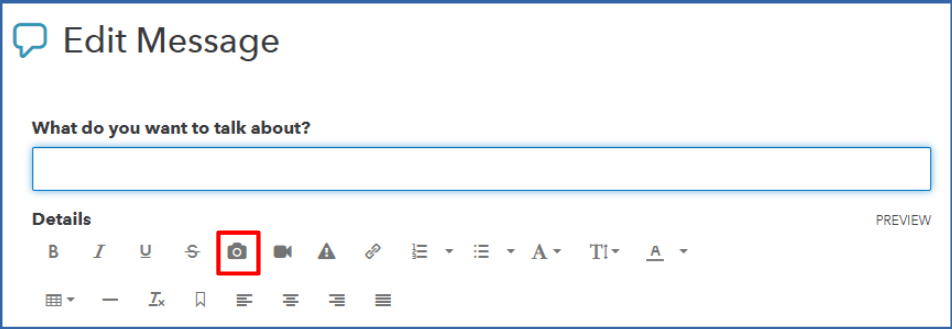
If you’d rather update your original post instead, you can do that too. We can hit the ellipsis (three-dot) icon in the upper-right corner of your original message and choose Edit Reply. This will allow you to update your post and upload your screenshot directly.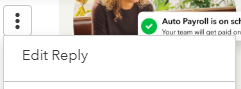
Feel free to give this a try, and let me know if these steps help you attach your picture easily. If you have any further questions about QuickBooks Desktop, including managing customers, please don't hesitate to reach out. I’m here to assist you and ensure you get the help you need.


You have clicked a link to a site outside of the QuickBooks or ProFile Communities. By clicking "Continue", you will leave the community and be taken to that site instead.
For more information visit our Security Center or to report suspicious websites you can contact us here


