Turn on suggestions
Auto-suggest helps you quickly narrow down your search results by suggesting possible matches as you type.
Showing results for
Get 50% OFF QuickBooks for 3 months*
Buy nowI had a customer say they accidentally paid with the wrong credit card. How can I issue a refund?
Solved! Go to Solution.

Thank you for the clarification, @raffie613. Let's explore the Merchant Service Center or process a refund via check or cash.
When refunding card transactions, you'll want to either swipe the card or enter its card information. Since you currently don't have these details, please reach out to your customer and request their credit card number so you can complete the process.
Alternatively, you can issue refunds directly from the Merchant Service Center. Transactions within six months can be refunded via QuickBooks Payments without entering card details.

In the event a transaction is older than six months, you can issue a cash or check refund.
Please don't hesitate to click the Reply button below if you have any further questions. I'm here to help.
Welcome to the Community Forum, raffie613.
You can issue a refund in QuickBooks Desktop through the Credit Memos/Refunds menu. Follow these steps:
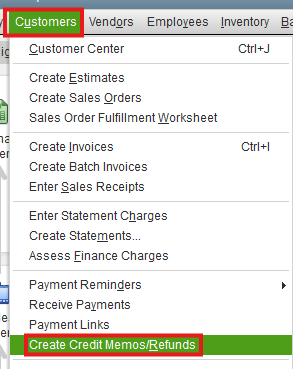
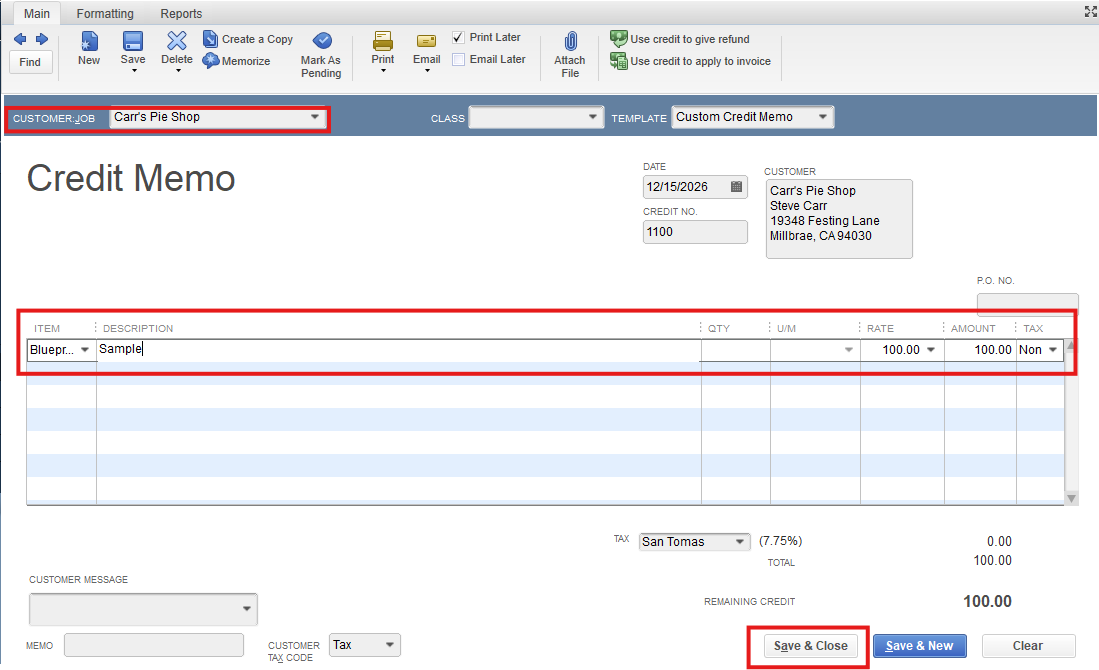
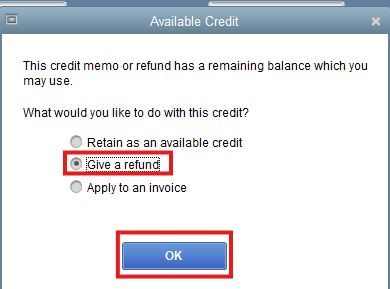
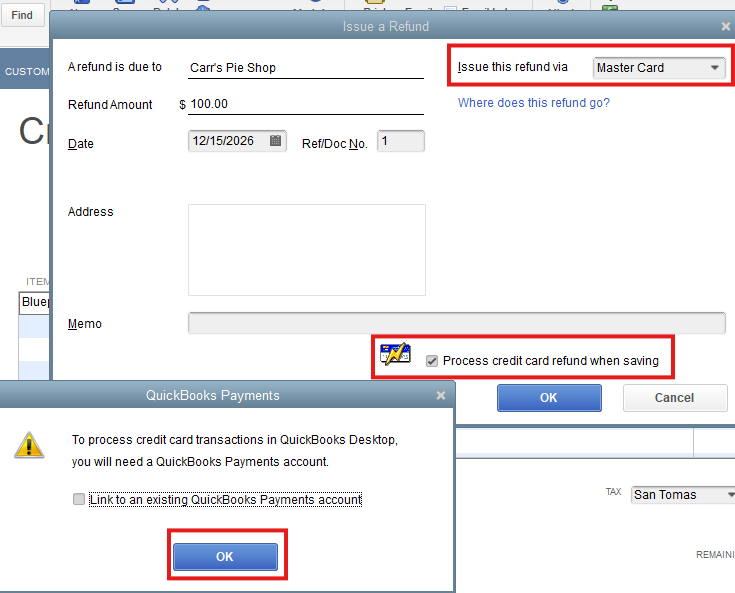
QuickBooks will apply the refund to your customer’s credit or debit card when it settles your latest batch of transactions at 3:00 PM PT daily. Keep in mind that it may take your customer 7 to 10 business days to see the refunded credit, depending on their bank.
If you need further help with issuing refunds, feel free to let us know. We’re always here to assist.
Hi, raffie613.
I just wanted to follow up to check if the resolution we provided helped resolve your issue. Please let us know if everything is now working as expected or if you’re still experiencing any problems.
We’ll be glad to assist further if needed.
I do not have the customer credit card number because they paid the invoice online.
How can I still issue a refund?
Thank you for the clarification, @raffie613. Let's explore the Merchant Service Center or process a refund via check or cash.
When refunding card transactions, you'll want to either swipe the card or enter its card information. Since you currently don't have these details, please reach out to your customer and request their credit card number so you can complete the process.
Alternatively, you can issue refunds directly from the Merchant Service Center. Transactions within six months can be refunded via QuickBooks Payments without entering card details.
In the event a transaction is older than six months, you can issue a cash or check refund.
Please don't hesitate to click the Reply button below if you have any further questions. I'm here to help.


You have clicked a link to a site outside of the QuickBooks or ProFile Communities. By clicking "Continue", you will leave the community and be taken to that site instead.
For more information visit our Security Center or to report suspicious websites you can contact us here


