Get 50% OFF QuickBooks for 3 months*

Buy now
cancel
Showing results for 
Search instead for 
Did you mean: 
Announcements
Simplify payday and set payroll to run automatically on QuickBooks. Explore QuickBooks Payroll
Rob66
Level 1

How can I remove the pay buttons from my invoice emails?

I have had a customer attempt to pay online using the View and pay button from the invoice email sent through Quickbooks. Can I remove this option?

2 Comments 2
GenieBabe_L
QuickBooks Team

How can I remove the pay buttons from my invoice emails?

Hello there, @Rob66.


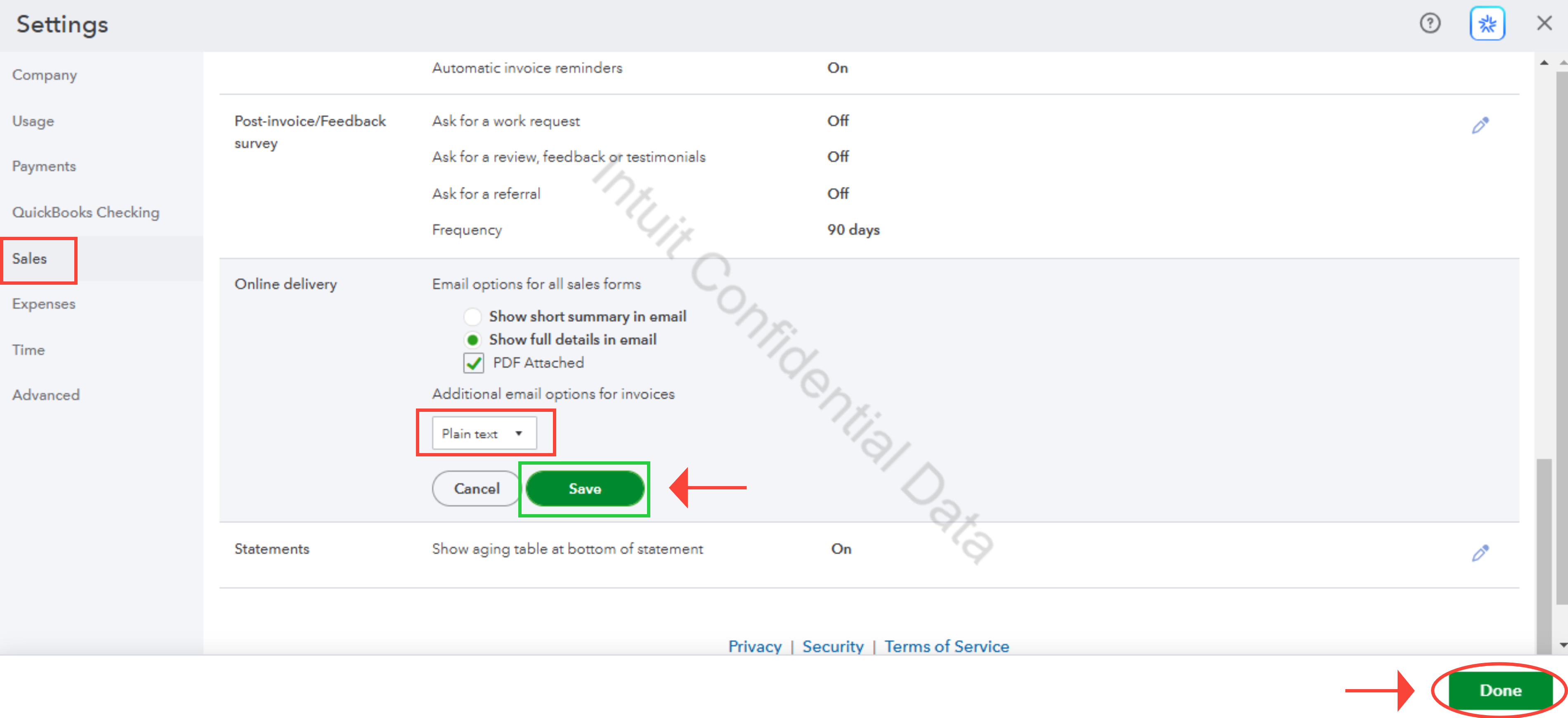
QuickBooks Online (QBO) allows you to remove the Pay option from your invoice emails by selecting Plain text in your Account and settings.


Here’s how:


  1. Go to the Gear icon, then choose Account and settings under YOUR COMPANY column.
  2. Select Sales.
  3. Scroll down until you find the Online delivery section.
  4. Below the Additional email options for invoices, click the dropdown menu and choose Plain text.
  5. Select Save, then Done.


image.png


For further questions, leave a message below by clicking the Reply button.

Joemar_B
QuickBooks Team

How can I remove the pay buttons from my invoice emails?

Hi there, Rob66


I just wanted to follow up to check if the resolution we provided helped resolve your issue. Please let us know if everything is now working as expected or if you’re still experiencing any problems.


We’ll be glad to assist further if needed.

Need QuickBooks guidance?
Log in to access expert advice and community support instantly.

Need to get in touch?

Contact us