Hi, @renegademaintenance. I'm here to help you address your deposit concern. Let's work together on this one.
If you're using QuickBooks Online Payments, your deposits will occur within five business days, though the speed may vary based on the service and payment type.
Initial deposits may take longer due to merchant account setup. Once completed, future deposits typically occur within two business days. However, some banks may take longer to process the transaction.
If you're manually recording payments, you may have selected Undeposited Funds / Payments to deposit account for the deposit.
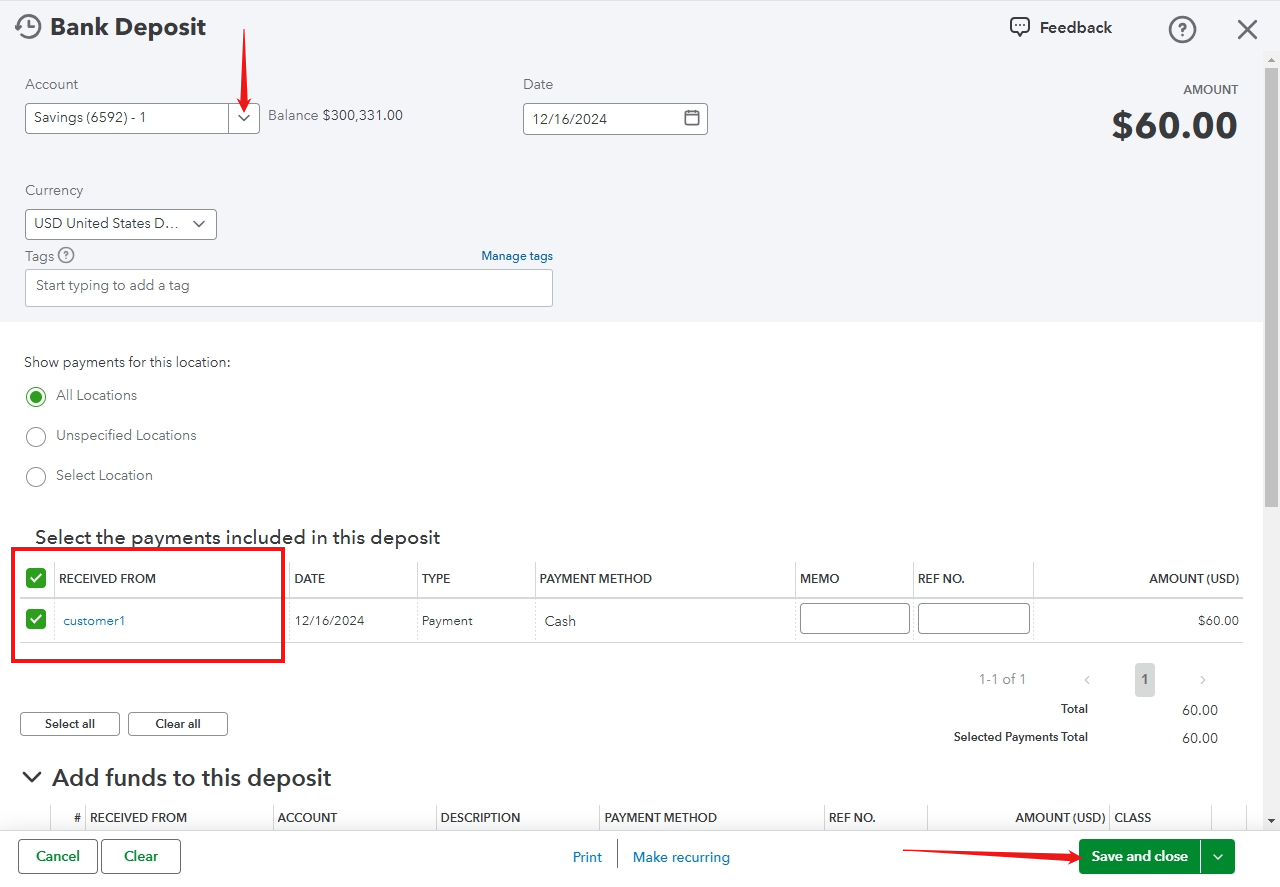
Here's how to manually deposit these payments:
- Go to the + New then select Bank Deposit.
- Click the drop-down arrow, and select the bank account you wish to deposit the payments.
- In the Received from the column, select the invoice/payment.
- Once done, click on Save and close.
To consolidate and integrate several transactions into one record that corresponds with your actual deposits, refer to this article: Record and make bank deposits in QuickBooks Online.
Provided below are some articles that can help you accurately record your transactions:
If you have further questions or need additional assistance with your deposit process, tick the reply button. I'm here to ensure you have a smooth experience with QuickBooks Online.


