Turn on suggestions
Auto-suggest helps you quickly narrow down your search results by suggesting possible matches as you type.
Showing results for
Get 50% OFF QuickBooks for 3 months*
Buy nowI have employees that are not listed as users in QuickBooks, but they have access to Workforce/Time app to log in and out. Problem is they can see when the other employees are working and I want to disable this. The help article I found says the following: https://quickbooks.intuit.com/learn-support/en-us/help-article/track-worker-time/enable-clock-via-qu...
Issue- There is no My Team option just Time Team, and when I go there I'm not able to select Team Member or edit them. If I go to the payroll portion and try to edit employees I don't get the option to edit this permission.
Help Please!
Solved! Go to Solution.
Hello there, ktliz. I want to ensure you can remove employees' access.
The My Team option is exclusive to QuickBooks Time. It seems like you're using your QuickBooks Online (QBO) account, that's why you only have the Time Team feature. I suggest opening your QB Time account and removing the access from there.
Here's how:
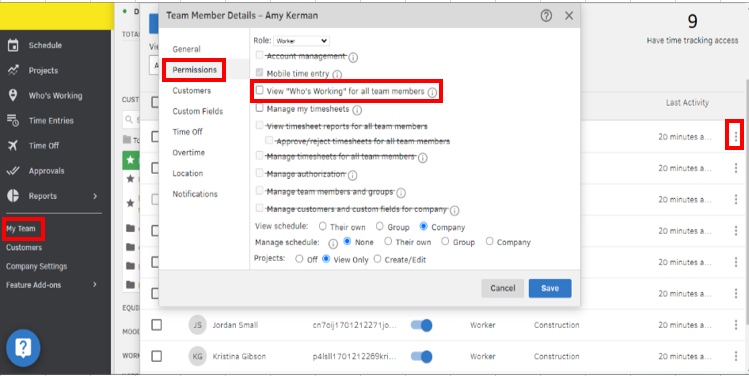
Additionally, you can refer to these articles for guidance on managing employees' timesheets and limiting clock-in/out locations in QuickBooks Time:
Let me know if you have other feature concerns or questions about managing employees' permissions in QuickBooks Time. I'm here to help. Take care.
Hello there, ktliz. I want to ensure you can remove employees' access.
The My Team option is exclusive to QuickBooks Time. It seems like you're using your QuickBooks Online (QBO) account, that's why you only have the Time Team feature. I suggest opening your QB Time account and removing the access from there.
Here's how:
Additionally, you can refer to these articles for guidance on managing employees' timesheets and limiting clock-in/out locations in QuickBooks Time:
Let me know if you have other feature concerns or questions about managing employees' permissions in QuickBooks Time. I'm here to help. Take care.


You have clicked a link to a site outside of the QuickBooks or ProFile Communities. By clicking "Continue", you will leave the community and be taken to that site instead.
For more information visit our Security Center or to report suspicious websites you can contact us here


