Thank you for dropping by the QuickBooks Community forum and expressing your concern, Laurila. Let's team up so you set up a client in QBO Time who needs to bill different clients at different rates.
In QuickBooks Time, setting up billable hours for employees isn't currently available since this is associated with invoicing your clients. However, we can set up Price Rules in QuickBooks Online to enable you to track client billable hours at different rates. This way, your client's employee rates should remain as is.
Here's how you can enable this feature:
- Go to Settings and choose Account and Settings or Company Settings.
- Proceed to the Sales tab, then click the Products and services section.
- Click the slider beside Turn on price rules Beta checkmark. Once enabled, it should change to the color green.
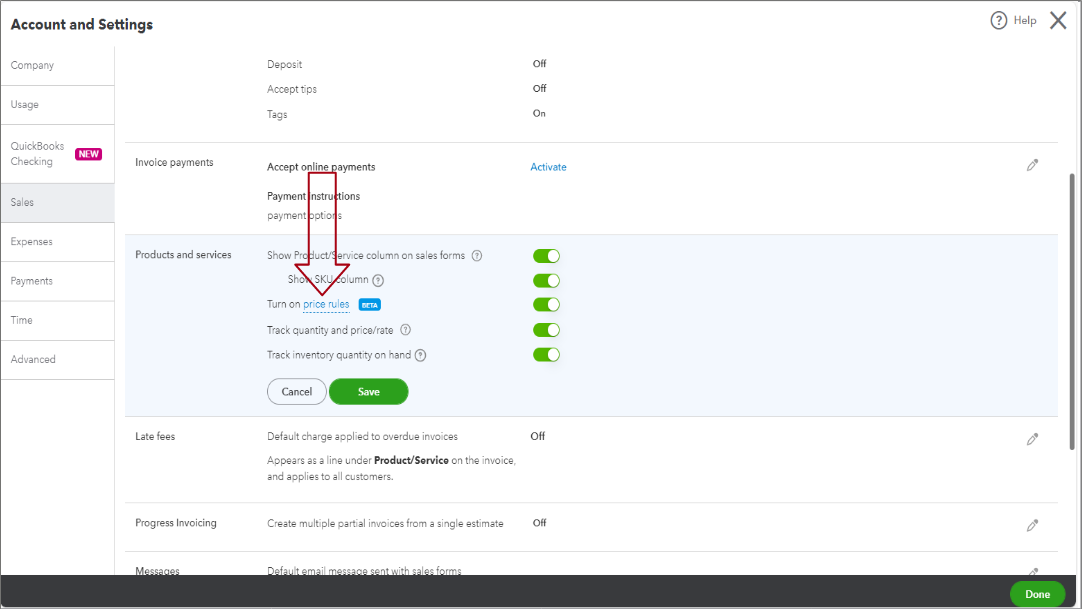
- Once done, click Save and then Done.
Here's an article for more info: Set price rules in QuickBooks Online.
Additionally, you can use projects to track your labor costs and profitability. Once you have set up a project, you can track labor costs in one of two ways.
Feel free to reach out if you need further assistance setting up different pay rates for your employees in QBO, Laurila. Let me know if you run into any difficulties. I'll do my best to assist you. Stay safe, and have a great rest of your week.


