Turn on suggestions
Auto-suggest helps you quickly narrow down your search results by suggesting possible matches as you type.
Showing results for
Get 50% OFF QuickBooks for 3 months*
Buy nowAre others having issues with QBSE invoices,taxes,profit and losses totaling in the app?
I am missing Jan. 2023 to June 2023 totals....but I can see the individual transactions and invoices." Formatting of the program also looks different.

Hi there, @jbgoodson.
I'm here to assist you in addressing these matters and finding a solution to ensure the accurate representation of your financial data.
The QuickBooks application stores cache files, which serve to enhance your browsing experience by saving time. Occasionally, these files can become obsolete or damaged, leading to problems similar to the one you're encountering with your account. To address this, here are the steps to reset the cache:
In your QuickBooks app:
In your device Settings:
You also have the option to turn off and restart your device or uninstall the application and reinstall it. After completing these steps, verify whether the totals are now visible.
Regarding the formatting of the program that looks different, can you send a screenshot of this? Any additional information you can provide would be greatly appreciated. Our goal is to ensure we offer you precise steps and accurate information to resolve this matter.
I'm also sharing the following references to help manage your account and transactions in QuickBooks Self-Employed:
Fill me in if you have further queries about missing accounting totals in QBSE. I look forward to assisting you in resolving other QuickBooks concerns promptly and effectively.
Ok...I do not own an iPhone....nor would I ever. In android the help has FAQ instead of refresh. In my laptop...I use QBSE mobile....so I can get my data anywhere. Even though I can see the year to date invoices. They are only totaling since June. Also no previous quarterly taxes or payments have been shown.
Let's make sure we can solve your accounting totals, JB.
We can reset the application to refresh the data using your Android device. To do so, you can follow the steps outlined below:
However, if you're still experiencing the same issue, uninstall and reinstall the app. Uninstalling an app removes the app data, cache, and user data. Reinstalling the app will free up some storage space on your phone. Here's how to reinstall an app:
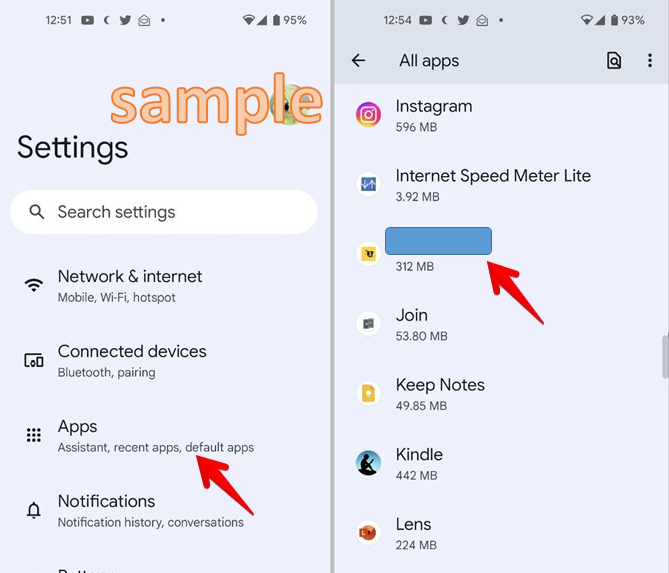
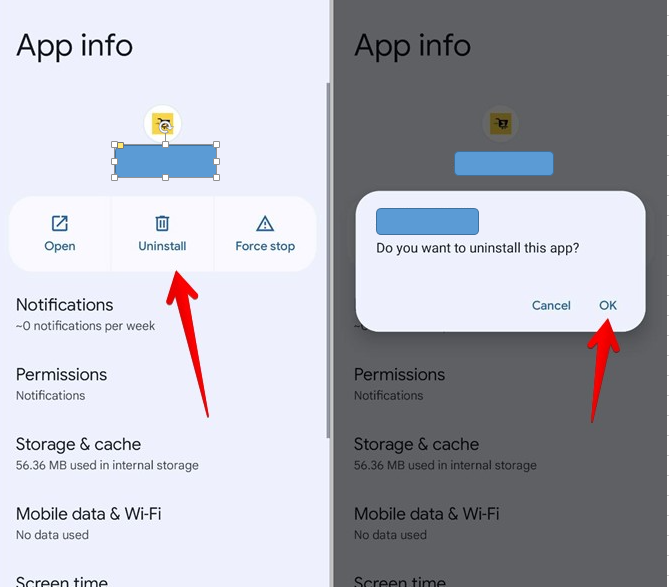
If the problem persists, I recommend reaching out to our support team so they double-check why this is happening and investigate further, They have the tools to pull up your account in a secure environment.
Moreover, QuickBooks Self-Employed (QBSE) helps you record your self-employed income and expenses, track mileage, and prepare your Schedule C tax form. I've added this article to give you an idea of what QBSE covers: Overview Of QuickBooks Self-Employed.
You can always get back to us if you have any questions about your accounting total in QBSE. I'd be happy to help. Have a nice day ahead!


You have clicked a link to a site outside of the QuickBooks or ProFile Communities. By clicking "Continue", you will leave the community and be taken to that site instead.
For more information visit our Security Center or to report suspicious websites you can contact us here


