Turn on suggestions
Auto-suggest helps you quickly narrow down your search results by suggesting possible matches as you type.
Showing results for
Get 50% OFF QuickBooks for 3 months*
Buy nowwhen i create invoice can't save service description get "application error" sign. Cleared cache, rebooted app still getting the same error sign. Please help need to send this invoice!

Thank you for doing some troubleshooting to resolve the error you encountered, @Jrosa. Let me share some news as I walk you through our experts.
Please know there's an in-progress report regarding the error you mentioned when saving an invoice. With this, I recommend reaching out to our Support Team. They can add you to the list of affected users so you get updates when available.
Here's how:
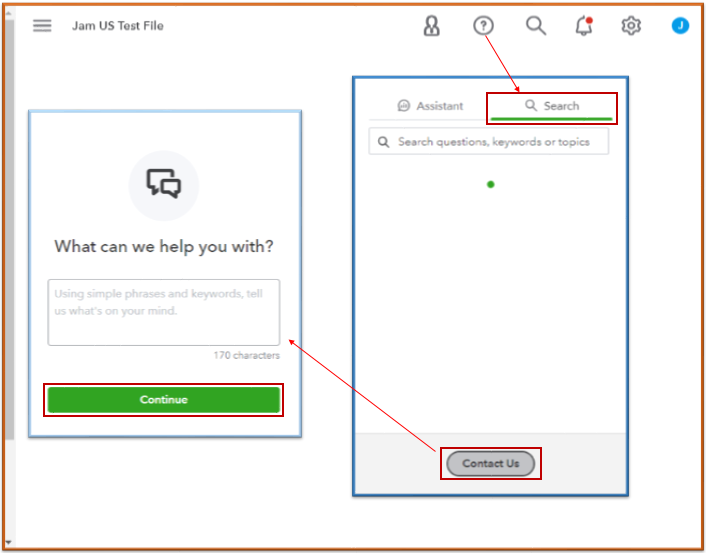
Note our operating hours so you can contact us at your convenience. For other ways to reach us, refer to this article: QuickBooks Online Support.
See this article to learn how to tailor your sales forms according to your preference: Customize invoices, estimates, and sales receipts in QuickBooks Online.
Bookmark this guide for documenting customer payments: Record invoice payments in QuickBooks Online.
If you have any other invoices or sales concerns, don't hesitate to add them below. I'll be here to help you out.
What was the solution to this problem i have it now? And need to send an invoice by 7am
I appreciate you for joining this thread to raise your concern, @Jeg2757. Let's perform some troubleshooting steps together to resolve the error message when sending an invoice in QuickBooks Online (QBO).
In some cases, error messages are caused by the frequently accessed cache stored in your browser. To clear them, you can log in to your account in an incognito window. Please see the following keyboard shortcuts:
Once resolved, you can return to your original browser to clear its cache or utilize another compatible one.
We've received similar reports from other users regarding the same error message. You can contact our customer support team to include you in the list of affected users.
Furthermore, I'll share this guide if you want to personalize the layout of your invoices: Customize invoices, estimates, and sales receipts in QuickBooks Online.
I'll leave this thread available if you have other questions about sending invoices. We'll respond promptly to continue assisting you. Take care.


You have clicked a link to a site outside of the QuickBooks or ProFile Communities. By clicking "Continue", you will leave the community and be taken to that site instead.
For more information visit our Security Center or to report suspicious websites you can contact us here


