Turn on suggestions
Auto-suggest helps you quickly narrow down your search results by suggesting possible matches as you type.
Showing results for
Get 50% OFF QuickBooks for 3 months*
Buy nowHi,
So i've matched most of my bill to bank feed. I see the amount. Originally it had a bill that it was making a payment towards. I re created the bill, but cant seem to attach that bill over to that bank feed.

Thanks for bringing this up, Nitsujayyy.
Keeping your transactions matched correctly in QuickBooks is key to maintaining clean and accurate financial records. If a bill is modified or recreated, it is important that we update the associated bank transactions. This involves unmatching the existing transaction and rematching it with the correct bill.
Let me help you get this sorted out:
For further information on reviewing and matching transactions, this guide is a great resource: Add and Match Bank Feed Transactions in QuickBooks Desktop.
Lastly, for future reference, to ensure your accounts accurately reflect your real-life bank and credit card statements, take a look at this helpful guide: Reconcile An Account in QuickBooks Desktop.
If you need further help or have more questions, feel free to reach out in this thread anytime. We're eager to help you navigate any challenges and ensure a seamless QuickBooks journey.
I know how to match... Im asking now since i deleted the entry in QBD, it doesnt show up in bank feeds.... I try reimporting new QBO file and still doesnt bring back the deleted matched transactiob
It's good to know that you recreated the deleted bill, nitsujayyy. I'll gladly help you manually match your transactions from the Bank Feeds menu.
When matching a transaction, it's important to ensure that the created bill contains the same information, such as the Number, Amount, Date, and Name, as the downloaded transactions to guarantee a match. Also, please ensure the bill is open before matching it with its payment.
Here's how:
On the other hand, if the bill status is already closed, you'll need to match the bill payment with another bill payment from the downloaded transactions.
Here's how:
For more information regarding matching transactions, please refer to this article: Add and match Bank Feed transactions in QuickBooks Desktop.
After matching your transactions, you may want to proceed with the reconciliation process and ensure that your accounts in QuickBooks are aligned with your actual bank and credit card statements.
I’m here to help you if you ever need assistance with matching your bill payments to your bills, nitsujayyy. Please feel free to click the Reply button and share your concerns whenever you need help.
I dont think we aligning. I matched it already once. I was changing bill and basically unmatched it. In the bank feed transaction in chart of accounts I still see the bank feed match but there was no bill. So I went ahead and deleted the transaction.
Thank you for your detailed explanation, Nitsujayyy. Let me help you resolve the deleted transaction and manage the bill properly.
First off, it's important to note that only payments and deposits appear in the Chart of Accounts under the bank account. This explains why you cannot see the bill there. Moreover, when you modified the bill, it remained matched rather than becoming unmatched.
However, since you have already deleted the transaction that appeared in the bank register, you can manually locate the bill in the Vendor Center and pay it directly. This approach eliminates the need to match transactions. Here's how:
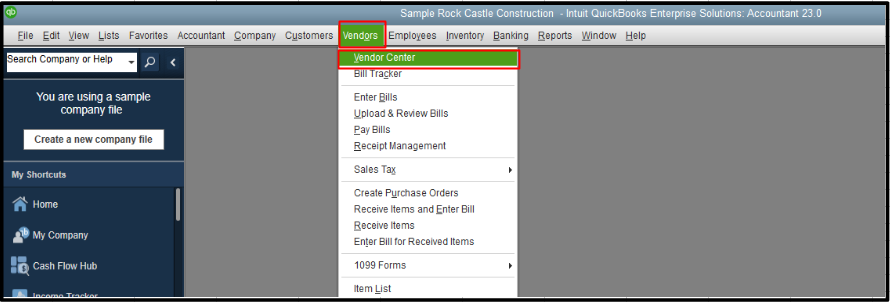
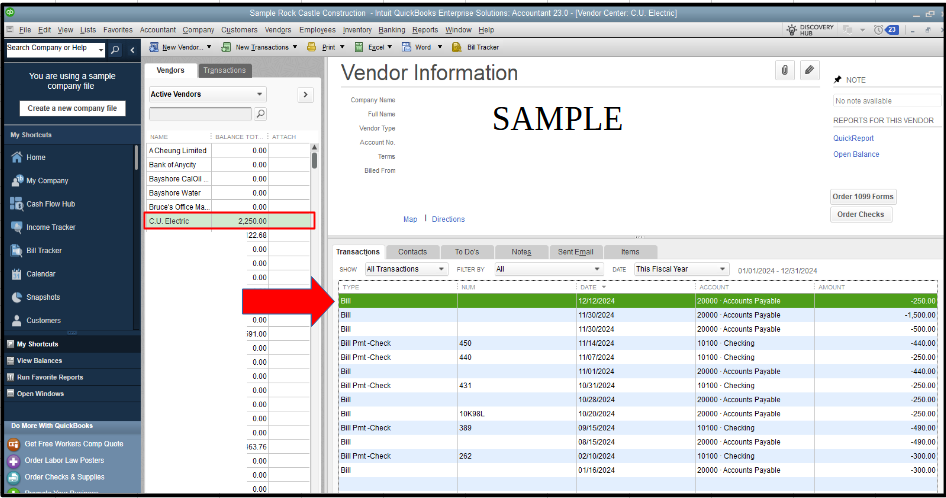
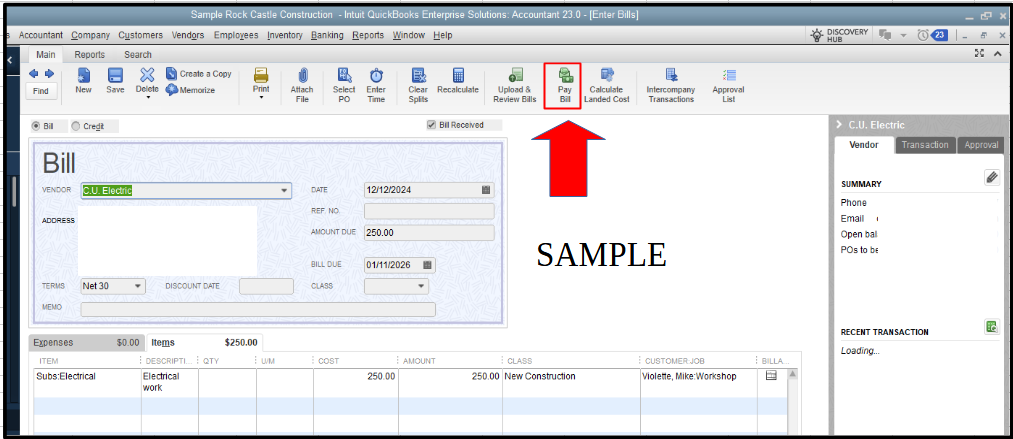
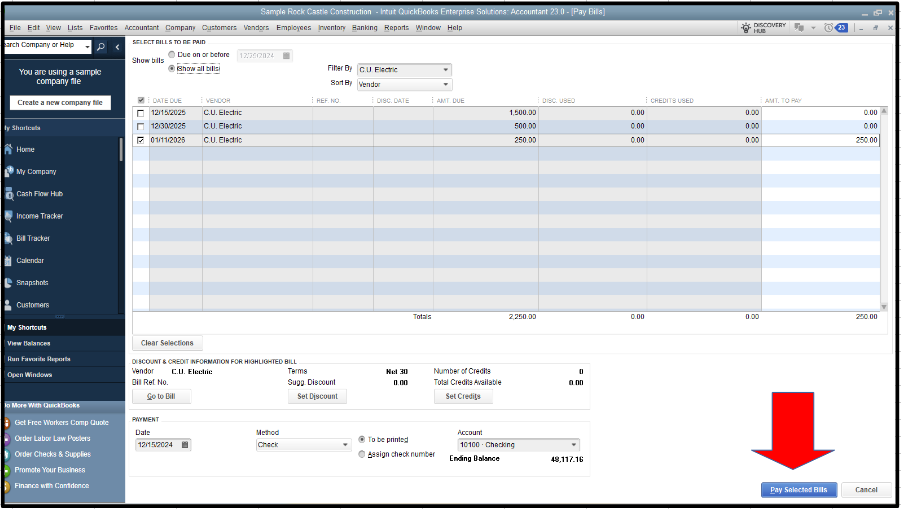
Additionally, I'll share this resource to ensure your accounts in QBDT match your bank statements and maintain proper financial records: Reconcile an account in QuickBooks Desktop.
If you have other questions about matching bank feed transactions in QBDT, comment below. We're always here to address all your concerns.


You have clicked a link to a site outside of the QuickBooks or ProFile Communities. By clicking "Continue", you will leave the community and be taken to that site instead.
For more information visit our Security Center or to report suspicious websites you can contact us here


