Thank you for dropping by the Community today, Roof Maxx.
I recognize the need to have all class budgets rolled up into a consolidated one. I'm here to help you find the best path to accomplish your objective.
In QuickBooks Online (QBO), we don't have a built-in statement for combined class budgets. Alternatively, let's export the report to Excel and manually compile all the individual class budgets into one master worksheet.
Also, you can have separate tabs for each class budget and a summary tab that sums up all the totals for a consolidated view. To export the statement, follow the steps below:
- Open your budget report and click the Report period drop-down to select the correct date range.
- From the Budget drop-down, choose the report type like, classes.
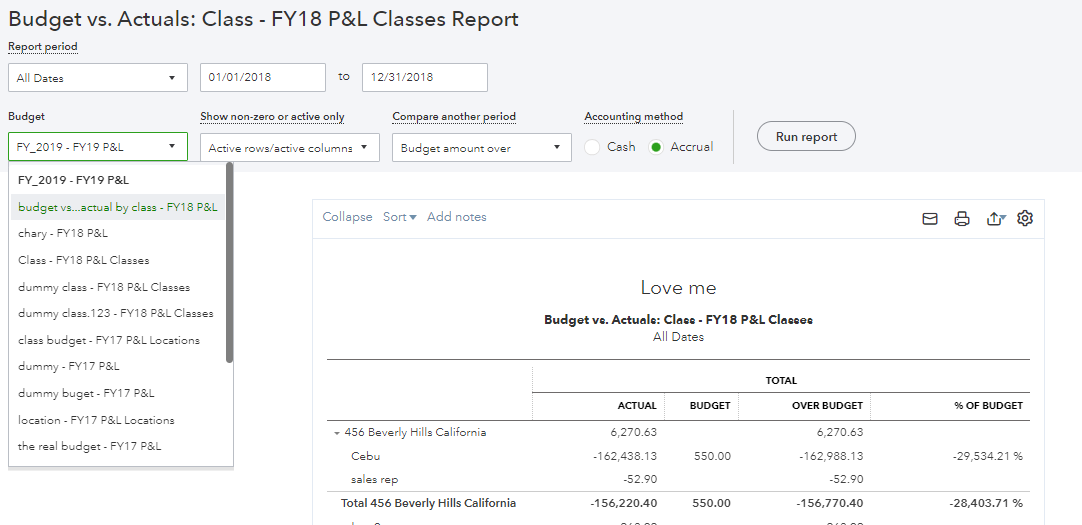
- Tap the Customize button if you wish to refine the data in the statement.
- Press the Run report menu to apply the changes.
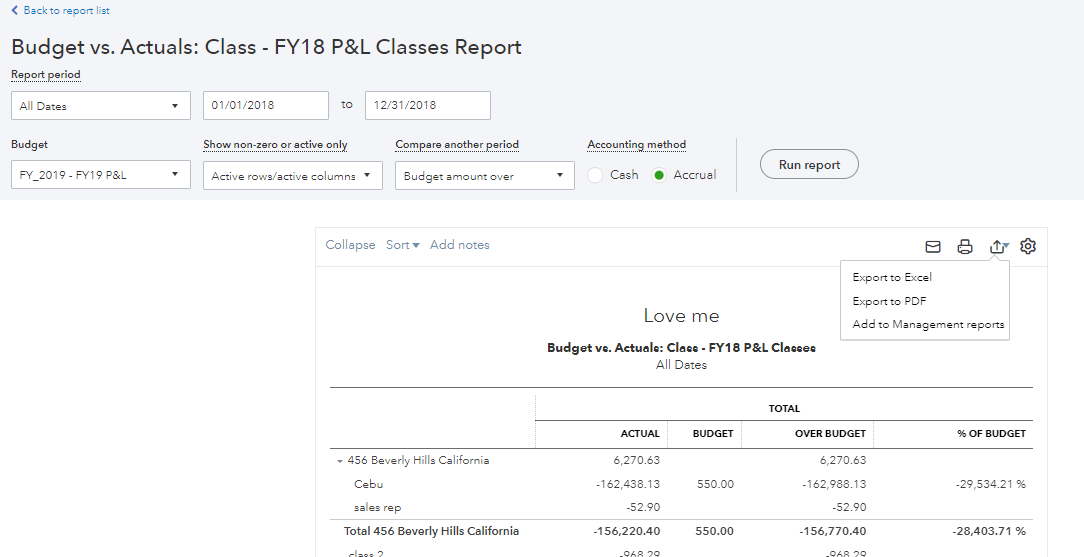
- Go to the Export icon and click the drop-down to select Export to Excel.
I have this helpful article that goes into great detail on customizing the layout of reports and keeping the current report preferences, to name a few: Customize reports in QuickBooks Online.
Furthermore, these resources include in-depth information on how to track financial goals for the business, as well as recommendations on how to keep the current customized settings on statements.
@roof Maxx, if you need further assistance running budget reports or concerns customizing one, click the Reply button and tag my name. I'll get back to help make sure you're taken care of. Have a good one.




