Thank you for posting in the Community, @dorothyschafer25.
Let's make sure that you'll turn on the Custom transaction numbers, so you can correct the sales receipt number. Here's how:
- Go to the Gear icon, then choose Account and Settings.
- Select the Sales tab.
- Click anywhere within the Sales form content section.
- Check the box next to Custom transaction numbers.
- Click Save and then Done.
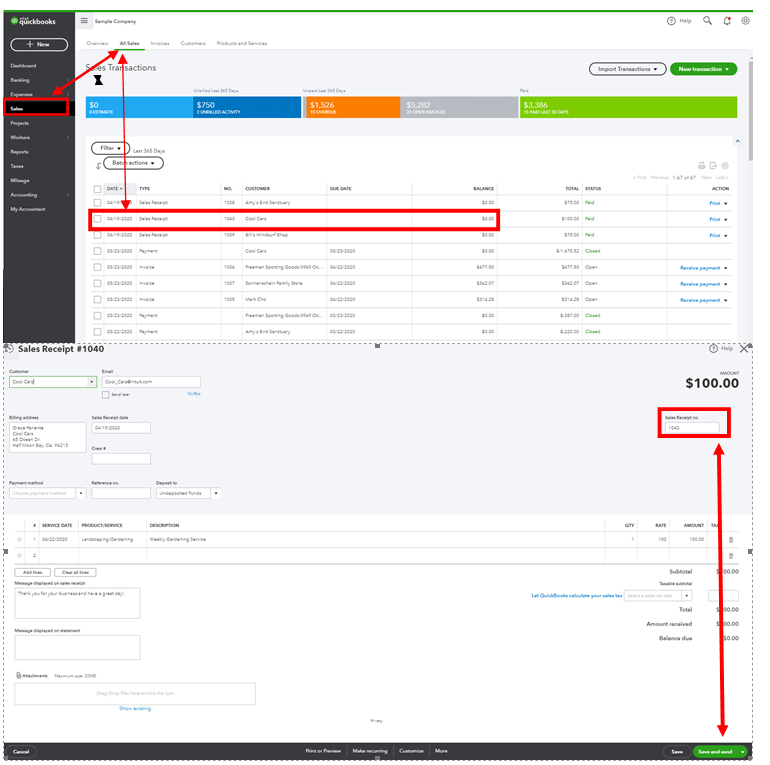
Once done, open the sales receipt in the All Sales tab and enter the correct number.
To do so:
- Click Sales in the right pane.
- Select All Sales.
- Choose Customers.
- Locate and click the customer's name.
- From the Transaction List tab, select the sales receipt.
- Enter the correct number in the Sales Receipt no. field.
- Hit Save and close.
To know more about the sales receipt, you can check out this link. It also provides a video tutorial for visual reference.
Also, if you want to create your sales receipt in advance, you can set up a recurring sales receipt so you don't have to create one every time.
Fill me in if you have any other questions about sales receipt or any other QuickBooks concern. I'm always here to lend a hand. All the best.




