Hi there, @robertoflores.
Thank you for reaching out to the Community. Creating an invoice from an existing purchase order is not possible. You'll need to enter it manually. However, you can create a bill and make it a billable expense and link it to an invoice as a workaround.
Here's how:
- Click the + (New) icon.
- Choose Purchase Order.
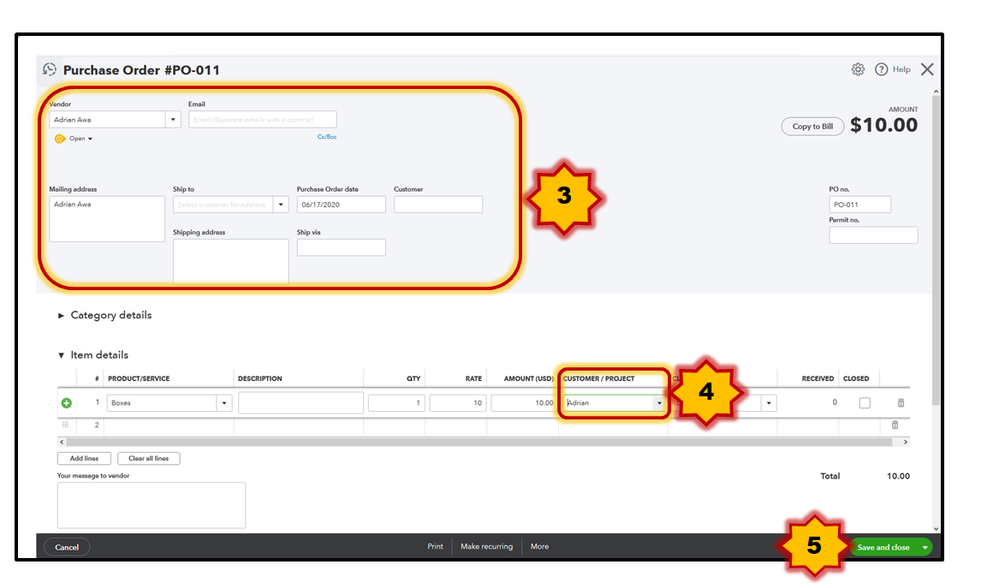
- Enter the necessary information.
- On the Item details field, select the items and make sure to add the customer.
- Click Save and close.

After that, add the billable transaction when you create an invoice. In case you haven't enabled the billable expenses feature, just follow the steps in this article: Enter billable expenses by job.

That's it. Keep me posted if there's anything else I can do for you. Just mention my name or click the "Reply" button. Have a wonderful day!




